
Definition of mandate themes
When you grant a mandate to another party in Suomi.fi e-Authorizations, its competence is limited by a mandate theme.
- In practice, the mandate theme illustrates what granting the mandate in question means to the assignor and what the assignee’s rights are.
- Mandate themes describe competences, not an individual e-service.
- The mandate theme must comply with laws and agreements.
Contents:
- Suitability of existing mandate themes for your service
- Definition of a mandate theme
- Checklist for planning a mandate theme
- Introduction of a mandate theme
- Examples of proposals for new mandate themes
- Specifiers of a mandate theme
- Life cycle of a mandate theme
First go through the suitability of the existing mandate themes for your service
First check whether a mandate theme suitable for your needs can be found among the already published mandate themes. To see the list of mandate themes, click here.Opens in a new window.
First, discuss what services your end users need and based on this, assess whether one/some of the current mandate themes are sufficient or whether it is necessary to create a new one. Even if an existing mandate theme describes a wider competence than what you have planned for your e-service, you can still start to use it. Each mandate theme describes the maximum competence granted with it, in other words, what it enables if separate restrictions are not set. You can set restrictions for using the mandate theme in your own e-service.
If suitable mandate themes are not available, you can propose the definition of a new mandate theme according to the instructions below.
You can make a list all of the mandate themes that will be introduced in your e-service and include it in your access licence application or notify them later when the deployment progresses.
Definition of a mandate theme
PLEASE NOTE! Send the proposal for a new mandate theme for processing well in advance, as there must be enough time to process, translate and test the mandate theme.
The definition of a new mandate theme should begin with a description of the competence.
The description of the competence always indicates the maximum competence of the mandate. The mandate can also be utilised in part so that the e-service instructions describe what areas of competence are utilised in the e-service. When defining the mandate theme, remember that it is not possible to add anything to the competence afterwards. At the definition phase, you must therefore take into account any changes that may take place in your service.
Services use that has not been mentioned in the mandate theme must not be allowed in the e-service. It is perfectly in order to allow a smaller number of actions in the e-service than what is indicated in the mandate theme.
In the description of the competences,
- always use the word mandate, even if the name of the object to be described does not include the word mandate but the word consent or permission, for example
- always refer to the assignor and the assignee (and not, for example, a service provider, an individual or a company)
- do not mention the name of the e-service, its provider or the system used
- only describe what the mandate can be used for.
The name of a mandate theme must always indicate an action. A good name helps the user find the mandate themes they need. For example, “vehicle registration” or “submitting salary information” are such names.
The type of principal is also specified for the mandate theme. It may be a person, a company or both. In practice, this means that only those mandate themes that can be used for acting on behalf of an organisation are displayed to those acting on behalf of an organisation in Suomi.fi e-Authorizations, and only those that can be used for acting on behalf of another person are displayed to those acting on behalf of another person.
Checklist for planning a mandate theme:
The proposer of the new mandate theme should be able to answer all of the following questions:
- Have the use cases and service paths of acting on behalf of another party been identified comprehensively in your service and processes so that precise mandate themes can be defined?
- Does the mandate theme provide a comprehensive description of the competence that the mandate will give to the party acting on behalf of another party? As matters cannot be added to the competence afterwards, upcoming changes to your services must already be taken into account when defining the mandate theme
- Has the mandate theme been formulated so that it enables the assignor to understand what rights they are granting or what powers they are assigning?
- Have the names of the service, service provider, system, view and form been omitted? Are the words mandate, assignor and assignee used in the description?
- Has the mandate theme been given a name that is easy to find?
A linguistically valid proposal is not automatically an acceptable mandate theme.
Once the mandate theme has been activated, its contents cannot be changed.
Introduction of a mandate theme:
If a mandate theme suitable for you already exists:
Notify the deployment team of Suomi.fi e-Authorizations (valtuudet-kayttoonotot@dvv.fi) of which mandate theme you want use. After this, the Digital and Population Data Services Agency transfers the mandate theme to the testing environment and grants your e-service access to it for testing.
If you want to define a new mandate theme:
- Format the mandate theme according to the instructions.
- Submit the proposed mandate theme to the deployment team of Suomi.fi e-Authorizations (valtuudet-kayttoonotot@dvv.fi). Record the name of the mandate theme, a description of the competence and the type of principal (person and/or company) in your message. Also notify your desired timetable for starting to use the mandate theme.
- Describe in free form who is acting on behalf of whom and in what matters. The descriptions help the Digital and Population Data Services Agency working group on mandate themes to understand what the mandate theme is about.
- The proposals will be discussed in a working group that will propose corrections if necessary and return the proposal to your organisation for review and approval.
- Once the proposal has been approved, we will have the mandate theme translated into Swedish and English. The translations will be submitted to your organisation for review.
- The Digital and Population Data Services Agency transfers the mandate theme to the testing environment and grants access to it in your e-service for testing.
- When the translations have been approved, we will transfer the mandate theme to the production environment according to the agreed timetable.
- After the publication, we will grant you access to the mandate theme in your e-services in the production environment. If the e-service is not yet in production, access will be granted later.
- Update your organisation's client instructions for the new mandate theme.
Examples of proposals for new mandate themes:
The examples are not real.
This kind of mandate themes work well:
Name of mandate theme | Description of competences | Justification |
Reporting an occupational injury | This mandate allows the assignee, on behalf of the assignor, to report information about occupational injuries and supplement, correct and view information related to the reports. |
|
Management of an electricity connection and the place of use | This mandate allows the assignee, on behalf of the assignor, to subscribe to, change and terminate an electricity connection, manage the details of the place of use, and view the contract and processing details of the connection and the place of use. |
|
This kind of mandate themes cannot be approved:
Name of mandate theme | Description of competences | Justification |
|---|---|---|
Managing a company’s affairs | This mandate allows the assignee, on behalf of the assignor, to manage all of the company’s affairs. | The competence is too broad and endangers the assignor's legal protection. The assignor will not be able to conclude whether the mandate covers matters such as taxation, banking, HR information, insurances, agreements or all of them. It is not possible to understand what the limits of the mandate are. |
Main user’s mandate | This mandate allows the assignee to act as the organisation’s main user. | The assignor cannot conclude from the description of competence what the mandate actually allows the person to do and with regard to what matter or matters. It is not possible to understand the limits of the mandate merely on the basis of the mandate theme. |
Sending form 14B | This mandate allows the assignee, on behalf of the assignor, to send form 14B. | The mandate theme is tied to the technical identifier of the form, which the assignor may not necessarily understand and which may change. The name does not reveal what the form concerns. It describes an individual implementation phase and not the required competence as a whole. |
Specifiers of a mandate theme
A specifier restricting the mandate theme may be specified for it.
The use of specifiers should be carefully considered, as using a specifier makes granting mandates slightly more difficult. In practice, the assignor must check the possible values of the specifier in the e-service instructions, as it is not possible to add checks to the inputs of the specifiers. The use of the specifier should be tested carefully, as it affects the response messages of the checking interface.
If a specifier is defined for the mandate theme, the assignor can enter any string with the maximum length of 200 characters as the value of the specifier.
The specifier variable name and the value entered as the specifier are added to the response message of the authorisation query as key-value pairs after the technical identifier of the mandate theme (URI). The name and description of the specifier are displayed to the end user when a mandate is granted. The specifiers are recorded in the national Authorisation register in connection with the mandate when granting a mandate in Suomi.fi e-Authorizations, and they remain with the mandate for as long as the mandate is valid.
We need you to provide the name and description of the mandate. In addition, indicate for which mandate theme and e-service you want to use the specifier. When we have received this information, we can implement the specifier for testing in the test environment.
In our testing environment, there are also test mandates with specifiers if you want to start testing the utilisation of the specifier immediately. You can tell us in which e-service you want to test a mandate with a specifier (WebAPI client ID or Data Exchange Layer identifier).
Example of a specifier:
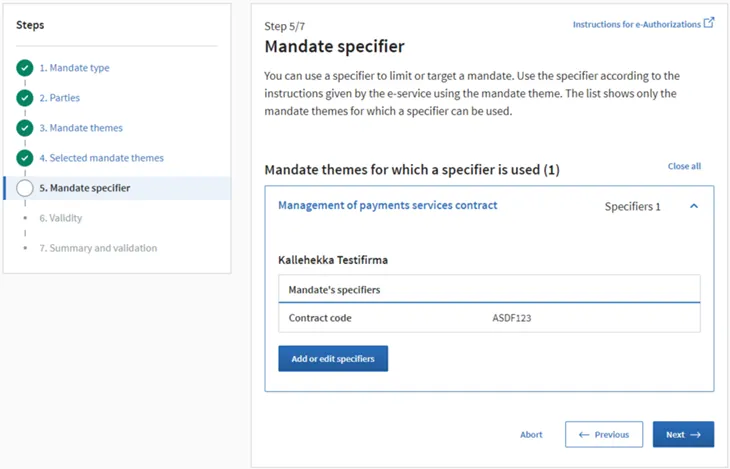
Here is an example of an authorisation query’s response message (WebAPI connection), in which the agent has the “Management of payments services contract” mandate from Lehtopojat Oy and the assignor has entered “ASDF123” as the value of the specifier named “Sopimustunnus”:
[{"name":"Lehtopojat Oy","identifier":"2136766-1","complete":true,"roles": ["http://valtuusrekisteri.suomi.fi/maksuliikepalvelusopimuksen_hallinnointi? sopimustunnus=ASDF123"]}]
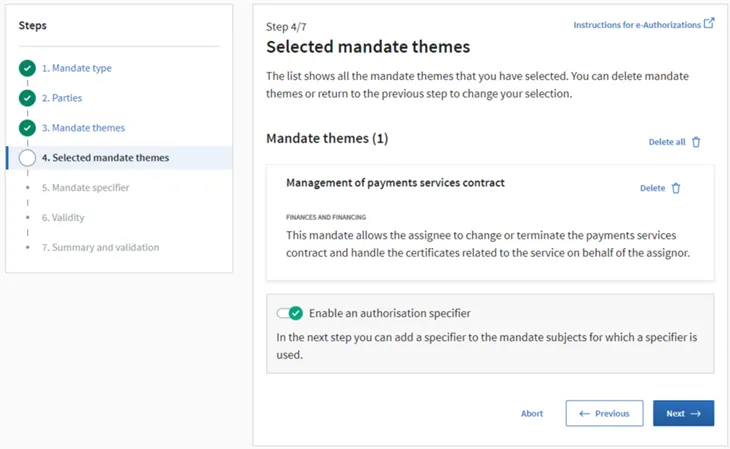
This is how the end user adds the specifier when granting the mandate:
1. The user selects the desired mandate type, the parties to the mandate and the mandate theme.
2. The user selects the item “Enable an authorisation specifier”. A specifier can be entered only for mandate themes for which a specifier has been defined.
3. The user enters the value of the specifier and selects “Next”.
4. In the end, the user validates the mandate as usual.
 Life cycle of a mandate theme
Once the mandate theme has been activated, its contents cannot be changed.
If the mandate theme is used for only one e-service and the e-service concerned terminates the use of the mandate theme in its service, the mandate theme can be removed from the end user' view. The possibility of its removal is always assessed together with the Digital and Population Data Services Agency. When a mandate theme is hidden from view, it can no longer be used for mandates, but the mandates already granted remain valid.