
Selection of connection type and interfaces
This article presents the two technical ways of connecting to Suomi.fi e-Authorizations and provides instructions for selecting a suitable connection type. The connection types are Web API and the Security Server, which is also called Data Exchange Layer connection.
Web API is usually always used for acting on behalf of another person. Web API or Data Exchange Layer connection can be used for acting on behalf of an organisation.
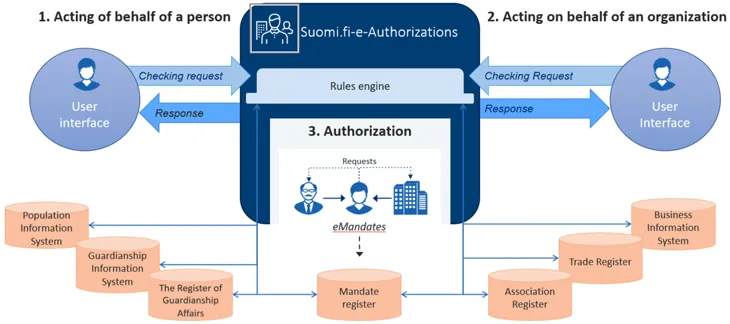
Web API is suitable for acting on behalf of both another person (HPA) and an organisation. It makes it easy and quick to create authorisation queries. The fastest deployment from planning to production was implemented in four days.
The Web API interface provides a user interface for selecting the situations where action on behalf of another person is required and the REST query interfaces for making authorisation queries. REST / JSON interfaces, which are protected with API Key or OAuth2 + +API Key authentication, are used for calling the interface. For more information, see the Web API interface description.
In the Web API connection, the principal is always selected using the selection interface of the e-Authorizations service, to which the user’s session is directed from the e-service. After the selection, the user’s session returns to the e-service.
Using the Web API, the mandate check queries of the e-Authorizations service are conducted via the public internet, which means that there is no need for a separate Security Server. REST/JSON interfaces are used in calling the interface.
Web API is used in acting on behalf of another person, for example, in MyTax and MyKanta.
Using the Data Exchange Layer in the e-Authorizations service is mainly suitable for acting on behalf of an organisation.
It is advisable to reserve considerably more time for the deployment of the Data Exchange Layer than for the WEB API connection. The process usually takes several months.
The interface to be used is provided via the Data Exchange Layer (X-Road 6). Therefore, using the Data Exchange Layer in the e-Authorizations service also requires the deployment of the Data Exchange Layer, the installation and maintenance of a Security Server, and allowing certain things in the firewall settings. Familiarise yourself with the deployment of the Data Exchange Layer.Opens in a new window.
Authorisation queries are transmitted as SOAP messages between systems. Queries can be run without the user noticing.
Using the Data Exchange Layer in the e-Authorizations service makes it possible to select a principal using the e-service’s own user interface.
Read more about the following interface descriptions:
- interface description of the mandate check query when acting on behalf of an organisation
Using the Data Exchange Layer in the e-Authorizations service requires the deployment of the Data Exchange Layer, a Security Server, and allowing certain things in the firewall settings. The internal traffic of the Data Exchange Layer is that between Security Servers across the public internet. The interface implementation of Security Servers uses a SOAP communication protocol based on XML.
The Data Exchange Layer is used as a connection type in acting on behalf of a company, for example, In MyTax.
If you want to enable acting on behalf of another person in the e-service, the recommended connection type is Web API connection.
If you want to enable acting on behalf of both another person and an organisation in the e-service, the recommended connection type is Web API connection. Otherwise, the integration will have to be implemented in two different ways.
If you only want to enable acting on behalf of an organisation in the e-service, and the principal should be selected using the e-service’s own user interface, the only option is the Data Exchange Layer connection.
The following describes the end-user’s service path when using the e-service on behalf of another person. The first example shows how the service activity proceeds when using the Web API. The second example shows using the Data Exchange Layer interface.
Service path when using the Web API connection
- The end user identifies themselves in the e-service.
- The end user selects “Acting on behalf of another party”.
- The session is transferred to the selection interface of the e-Authorizations service. There, the user selects the party on whose behalf they want to act.
- After the selection, the session returns to the e-service. The user continues to act on behalf of the selected principal (person or company).
Service path when using the Data Exchange Layer connection
- The user identifies themselves in the e-service.
- The user uses the e-service user interface to select the company on whose behalf they want to act.
- After this, the user continues to use the service on behalf of the company they have selected.
Web API connection
First submit the access licence application.Opens in a new window.
Notify the e-Authorizations deployment team of the Web API return address. It is the address of your organisation’s e-service to which the end user’s browser session is directed when the principal has selected the e-Authorizations service using the selection interface.
During the testing phase, the Web API return address can be localhost. The protocol must be HTTPS if the address directs to an address other than a localhost address.
When the e-service starts the OAuth authorisation process, it relays to the e-Authorizations service a redirection address to which the user’s browser is directed after the principal has been selected. In order to ensure that the OAuth key relayed with the return request does not end up in wrong hands, the e-Authorizations service will only assign the redirection to addresses provided to it in advance. The e-service must provide detailed redirection addresses to the e-Authorizations service as part of the connection process.
Data Exchange Layer connection
Enable Data Exchange Layer.Opens in a new window.
Once your organisation has adopted the Data Exchange Layer, notify the e-Authorizations deployment team of the necessary details of your subsystem:
- Member Class
- Member Code
- Subsystem Code.