
Technical interface description
The article presents the technical interface description and the operating environment for Suomi.fi identification, a general description of the service's operations and the general technical characteristics.
Suomi.fi-identification environment
The identification service offers the e-services identification of the end user via an interface that complies with the SAML 2.0 standard. For the end user, the Identification creates an opportunity to choose the appropriate identification method and a one-time login to the e-services linked to the Identification.
The e-service can limit the permitted identification tools that the end user can use to identify themselves. If the end-user has been strongly authenticated, the Identification service complements the user's data from the population data system.
The image below describes the business environment of the Identification.
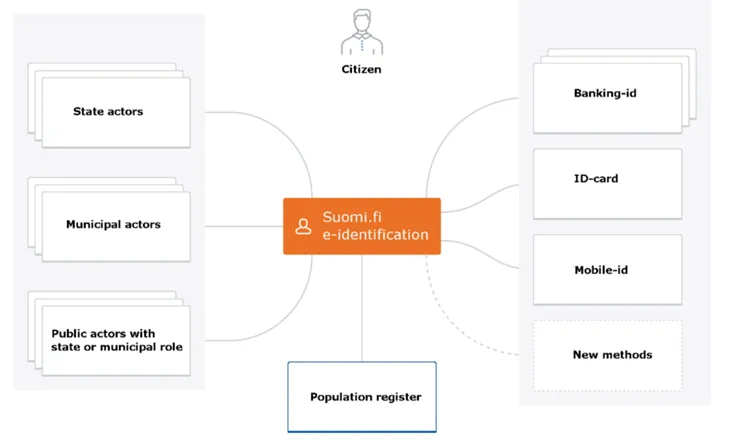
A general description of the Identification business service
The e-service uses the Suomi.fi identification to identify the user. The Suomi.fi identification shows the user the identification tools providers approved by the e-service and the user chooses the identification that best suits.
For Finnish identification tools, the Identification service in the population data system checks that the identified end-user has an active social security number and that the owner is alive and complements the end-user's data from the population data system. The Identification service produces a message according to the SAML 2.0 standard after successful identification. The message transmits the desired information via the end-user's browser to the e-service.
For eIDAS-identified users, the individualizing PID code and name and birth time information are communicated and the user is directed to the e-service. For these users, the data cannot be supplemented by the population data system.
The identification tool "urn: oid: 1.2.246.517.3002.110.7" returns the identification code, date of birth and name information of the identified user.
The Identification Architecture service does not require any direct links between the Identification and the services provided by the Identification Tool providers, but all traffic takes place according to the SAML 2.0 standard via the end-user's browser.
HTTPS connections are used to protect the data communications used to identify the end user and the identities of the parties. The message consistency is ensured in accordance with the SAML 2.0 standard.
Identification security levels
The identification uses the confidence levels for the identification that have been determined in accordance with FICORA's definitions of the trust level network. Trust level refers to how "strong" the identification tool is, ie. the level of trust in the identity information it offers. The e-services themselves determine what the appropriate level of identification is. Tools in addition to the strong tools should be selected one at a time.
A description of the confidence levels:
- High level of trust - the highest level of strong authentication. Finnish SecID card, is on this level.
- Elevated trust level - an elevated trust level for strong authentication. Hightrust.id, Banking ID and mobile ID identifiers on this level.
- No confidence level - some of the identification tools have not been set for any level of trust and they are determined separately.
The confidence levels of the identification also apply to the European eIDAS identification. High and elevated confidence levels defined in Finland correspond to their definitions of the high (high) and elevated (substantial) confidence levels of the eIDAS identification.
From September 2018, the confidence levels of eIDAS identification must be defined as approved in addition to the confidence levels of the Finnish trust network. The response that is communicated about the identification events to the e-service depends on the level of trust of the trust network or the level of confidence of the eIDAS identification, depending on whether the user has identified himself with a Finnish identification tool or with the eIDAS identification.
Single Sign On and Single Logout
The Identification service creates a SSO login session for the end user that allows all e-services connected to the Identification with the same login to use. The SSO session is valid for 32 minutes. The e-service may choose its own session time regardless of the Suomi.fi session time.
For the SSO, the e-services' approved tools and confidence levels are utilized. Access to the e-service without re-identification is possible only if the level of confidence or the tool used to create the session corresponds to at least that established for the e-service.
The e-service associated with the Identification service must support a SSO according to the SAML 2.0 standard. When the end user logs out, the other sessions that belong to the same SSO session are also terminated. The e-service must be able to both initiate the log-out process and handle the log-out request that comes from the Identification. Local logout should be done before sending the SLO request to Suomi.fi.
Service provider can't send the SLO-message in back-channel, because at logout the user will be shown the SLO status information of all services that were logged in to using the same SSO-session and the user must confirm the check-out manually.
Due to the technical implementation of Suomi.fi e-Identification, the SLO-response is transmitted from the e-service in iframe. The e-service must allow this in its own settings. (Content-Security-Policy: frame-Ancestors 'self' https://tunnistautaminen.suomi.fi;)
No SSO session is created when the user has logged on with eIDAS identification. Then the user is forced to re-identify when navigating to another e-service.
End user environment requirements
The Identification service is intended for use in web browsers. Its interfaces are used by browsers in the same way as the interfaces of the identification tools used for identification.
The Identification service can be used with different language options (Finnish, Swedish or English).
The use of the Identification service does not require the end user to install any programs on his workstation. However, the identification tools used to identify the end user may require additional components such as a certificate card reader.
End users web-browser
Requirements for the end users browsers:
- the Identification service has been created according to the HTML 5.0 standard, but also works with a scaled-down appearance if the browser does not support the HTML 5.0 standard
- the Identification service requires the approval of session cookies (HTTP session cookies) and JavaScript in the browser
- the Identification service uses TLS version 1.2
The use of identification tools
The identification methods used may require the end user to use specific tools or programs:
- For example, the bank codes can be based on a key code list or a mobile application.
- Identification with a certificate card granted by the Agency for Digitization and Population. Data (eg an identity card, social and health care activity card, organizational card) is done with the help of a card reader and a card program installed on the workstation.
- Identification based on mobile ID uses the operator's SIM card and the mobile phone.
- Hightrust.id - A certificate card and a mobile application downloaded from the app store are required to activate the wallet application.
Mobile device support
The Identification UI service works with a web browser. The service can also be used with mobile devices with the limitations presented under the section End users web-browser. Different identification tools may place restrictions on the use of mobile devices.
General technical characteristics of the service
The API is using SAML 2.0. Messages are deflated and Base64 encoded before they are transmitted.
Technical connection
The e-service is connected to the Identification service by submitting the basic information (metadata) to the Identification Administration. Familiarize yourself with the e-service's metadata in the Identification service.
The Identification service and the e-service sign the SAML 2.0 messages they send, so to ensure the origin, the recipient must have the sender's public key (in the certificate). In connection with the connection, the Identification Certificate is uploaded to the e-service server. The e-service's certificate is communicated to the Identification as part of the e-service's basic information (metadata).
The exchange of SAML-messages
SAML messages between the Identification service and the e-service go through the end-user's browser with the HTTP standard commands GET and POST. The standard SAML 2.0 determines, how the SAML message is conveyed in the respective HTTP command.
The e-service calls the Identification service to send an identification request message containing a return address to the end-user's browser with the GET or POST command. The Identification service allows the end user to identify themselves in any way. The Identification service sends a response message to the e-service's return address with the POST command. The assertions in the response message are encrypted with symmetric encryption, where the encryption key is asymmetrically encrypted with the public key found in the service’s metadata.
Message traffic is encrypted with TLS, ie. all calls and response messages are transmitted via HTTPS connection. The e-service should ensure that all connections between the end-user's browser and the e-service are HTTPS encrypted.
The part of the response message containing personal data is encrypted with symmetric encryption, where the encryption key is asymmetrically encrypted with the public key found in the e-service’s metadata. The e-service service must define the key used for encryption in its metadata with the purpose “encryption” or by leaving the key’s purpose undefined.
The Identification service is called over an HTTPS connection. The return address provided by the e-service in its message shall utilize the HTTPS protocol.
All SAML messages are signed to ensure the sender, the integrity and the immutability of the message. The parties shall check the signing of the messages they receive.
Testing
It is easier to connect to the Identification service if you have access to a tool that opens SAML messages. There are extensions for the browsers, such as "SAML tracer" for Firefox, "SAML Chrome Panel" and "SAML Message Decoder" for Chrome.
Identification
The identification of the end-user in the Suomi.fi-identification is a SSO login to all the e-services linked to the Suomi.fi-identification.
An example of an identification event
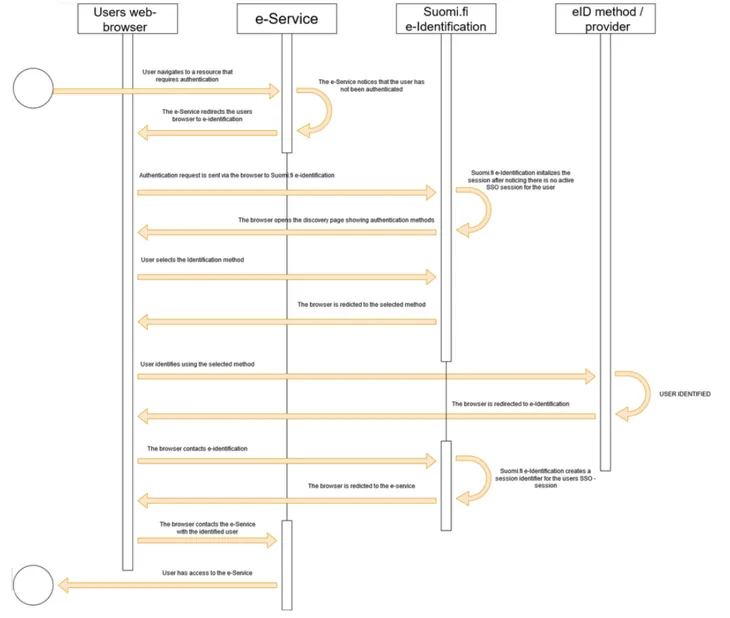
- The e-service notices that the end user has not been identified.
- The e-service directs the end user to the Identification service and sends a SAML request for identification to the browser.
- The end-user browser forwards the SAML identification request to the Identification service.
- The Identification service receives the SAML request for identification and returns to the browser a page where identification tools can be selected.
- The end user selects the desired identification method and identifies.
- The provider of the identification tool directs the browser back to Suomi.fi-identification.
- The browser communicates the identification tool to to Suomi.fi-identification along with the end user identification code provided by the provider.
- to Suomi.fi-identification creates a SSO session and creates a SAML message that contains the end-user information and communicates the message to the browser while to Suomi.fi-identification directs the browser back to the e-service.
- The browser communicates the personal information contained in the SAML identification response to the e-service, which initiates a session for the identified end user.
- The e-service returns the protected resource to the end user as requested.
The e-service can create the authentication request, for example by providing the browser with an HTML form that contains a SAML message in the hidden fields. The form can send a script that is executed automatically or the end user sends it by clicking the form's submit button.
...
  <form name=”APRO” method=”POST” action= ”https://testi.apro.tunnistus.fi/idp/profile/SAML2/POST/SSO">
 <input type=”hidden” name=”SAMLRequest” value=”fZJBU8I...”/>
 <input type=”hidden” name=”RelayState” value=”ss%3Amem%3Ac3”/>
 <input type=”hidden” name=”SigAlg” value”=http%3A%2F%2Fwww.w3.org%2F2001%2F04%2Fxmldsig-more%23rsa-sha256”/>
 <input type=”hidden” name=”Signature” value=”sO%2Fw..”/>
 </form>
...
var form = document.APRO;
form.submit();
...
<input type="submit" value="Siirry tunnistautumaan">
In the examples below, the following name definitions used throughout SAML 2.0 messages are used to convey data content.
xmlns:saml2="urn:oasis:names:tc:SAML:2.0:assertion"
xmlns:saml2p="urn:oasis:names:tc:SAML:2.0:protocol"
Authentication request
The information that controls the identification request is defined in the basic information (metadata) that the e-service provided to the Identification when connected to the service.
By customizing the content of the authentication request, you can influence the user interface visible to the user and the response message. For example, in the authentication request, you can choose the language that Suomi.fi-identification should use in its interface, which authentication methods are shown to the end user, and where the user’s browser is directed after the authentication event.
Supported bindings are HTTP POST and HTTP REDIRECT.
The identification request must be signed (using at least the SHA256 level algorithm).
e-service identity
Description | E-service code. Refers to the EntityID attribute defined in the e-service metadata. |
|---|---|
Placement | saml2p:AuthnRequest -elements saml2:issuer-element |
Format | Character string, length max 1024 characters. |
Madatory | Yes |
Example | <saml2p:AuthnRequest …> |
Table 1. e-service code, identification request.
Return address of the e-service
Description | The destination address of the message, i.e. the Identification address service. Determined in the identification metadata per connection. |
|---|---|
Placement | saml2p:AuthnRequest-elements attribute Destination. |
Format | Character string |
Mandatory | Yes |
Example | <saml2p:AuthnRequest … Destination=”…” |
Table 2. Return address, identification request
Time stamp
Description | Time when the authentication request was created. |
|---|---|
Placement | issueInstant-attribute for element saml2p:AuthnRequest. |
Format | Character string, 20 characters. |
Mandatory | Yes |
Example | <saml2p:AuthnRequest… IssueInstant=”2015-09-28T16:27:36Z”…> |
Table 3. Timestamp, authentication request.
User interface language
The interface language is determined by the language selection of the first authentication request in the same session. In other words, if the first service you authenticate to sets the language to Swedish, the interface language will also be Swedish when logging into another service (regardless of the language chosen for the authentication request in the subsequent services). This selection continues until you log out.
Description | User interface language. |
|---|---|
Placement | saml2p:Extensions-element's |
Format | Character string, 2 characters. This method should only be used if, for technical reasons, the language code cannot be included in the SAML message. |
Mandatory | No |
Example | <saml2p:AuthnRequest |
Table 4. User interface language, identification request.
The return address of the e-service or a reference to the return address
Description | The return address of the e-service or a reference to the return address |
|---|---|
Placement | saml2p: The AuthnRequest element attribute AssertionConsumerServiceURL or attirbut AssertionConsumerServiceIndex. |
Format | A URL whose protocol must be HTTPS, otherwise the Identification service will reject the message (using the Requester error code). |
Mandatory | No |
Example | <saml2p:AuthnRequest ... AssertionConsumerServiceURL=”https://kalastus.kunta.fi/SAML2/POST"or
|
Table 5. Return address of the e-service or a reference to the return address, the identification request.
Event code
Description | The event code set by the e-service that enables the preservation of the e-service's status information throughout the identification event. |
|---|---|
Placement | RelayState-variable. |
Format | Max 80 characters. |
Mandatory | No |
Example | <form method="post" action=”…. |
Table 6. Event code, identification request.
Approved identification methods
Description | In the identification request, the E-service can limit the group of defined identification methods in the metadata by providing a list of permitted levels of trust and tools. |
|---|---|
Placement | saml2:AuthnContextClassRef-element in saml2p:RequestedAuthnContext-element. |
Format | String with the possible values
In the test environment also
|
Mandatory | No |
Example | In the AuthnRequest messages expressed by the elevated confidence level and tools:
In the AuthnRequest messages expressed by the high level of trust: <saml2p:AuthnRequest |
Table 7. Approved identification tools, identification request.
Processing of the code
Description | Identification of the authentication event |
|---|---|
Placement | saml2p:NameIDPolicy-element in saml2p:AuthnRequest-element. |
Format | Attribute AllowCreate and Format. |
Mandatory | Yes |
Example | <saml2p:AuthnRequest |
Table 8. Processing of the code, identification request.
Identification response
The Identification service returns, in response to the identification, the information about the identified end user. In addition to the identity, for example, the e-service can obtain the end-user's name information and updated contact information from the population data system.
The return response is encrypted. The default algorithm used for encryption is AES-GCM.
Encryption can be configured with either AES-CBC or AES-GCM algorithms. Please note that the use of AES-CBC is not recommended. The setting is defined in the Service Provider metadata registered for Suomi.fi e-identification.
- The information communicated about an identified end-user with a Finnish identification tool
- The information conveyed about a user who has identified himself with eIDAS
Timestamps
Description | Time when the identification response is created. |
|---|---|
Placement | saml2p:Response-element's IssueInstant-attribut. |
Format | Character string, 20 characters. |
Mandatory | Yes |
Example | <saml2p:Response … |
Table 9. Time stamping, identification response.
Event code
Description | The event code that the e-service sends in the identification call that enables the preservation of the e-service's status information throughout the identification event. |
|---|---|
Placement | RelayState-parameter. |
Format | Max 80 characters. |
Mandatory | No |
Example | <form method="post" action=”…. |
Table 10. Event code, identification response.
Session identifier
Description | The single sign on session code created by the Identification service. |
|---|---|
Placement | saml2:NameID-element. |
Format | Text string max 1024 characters. |
Mandatory | Yes |
Example | <saml2p:Response … |
Table 11. Session identifier, authentication response.
Session index
Description | Session index for SSO |
|---|---|
Placement | SessionIndex-attribute value |
Format | String |
Mandatory | Yes |
Example | <saml2:AuthnStatement AuthnInstant="2016-05-13T11:42:42.573Z" SessionIndex="_2c41c54f41a76ec6aaeede9a9bc46a24"> |
Table 12. Session index for the SSO session.
The strangth of the authentication
Description | The identification strength level |
|---|---|
Placement | saml2:AuthnStatement-elementets saml2:AuthnContext-elements saml2:AuthnContextClassRef-element. |
Format | As a value, a code is returned in URN: OID format.
|
Mandatory | Yes |
Example | <saml2p:Response … |
Table 13. The strength of the identification event, the identification response.
Return status
Description | The return status of the authentication request |
|---|---|
Placement | saml2p:Response-element´s saml2p:Status-element. |
Format | String. |
Mandatory | Yes |
Example | <saml2p:Response … |
Table 14. Return status, authentication response.
Population register search successful
Description | The e-service is informed about the success of the PRS success. |
|---|---|
Placement | saml2p:Response-elements saml2p:Status-element. |
Format | String
|
Mandatory | Yes |
Example | <saml2:Attribute Name="urn:oid:1.2.246.517.3002.111.2" NameFormat="urn:oasis:names:tc:SAML:2.0:attrname-format:uri"> |
Attn. | Identification when population data system is umnvailable is defined by giving the value VtjVerificationRequired the value "false" in the metadata. By default, the element is added to the metadata with the value "true". |
Table 15. Status of the PRS -search.
Sign out
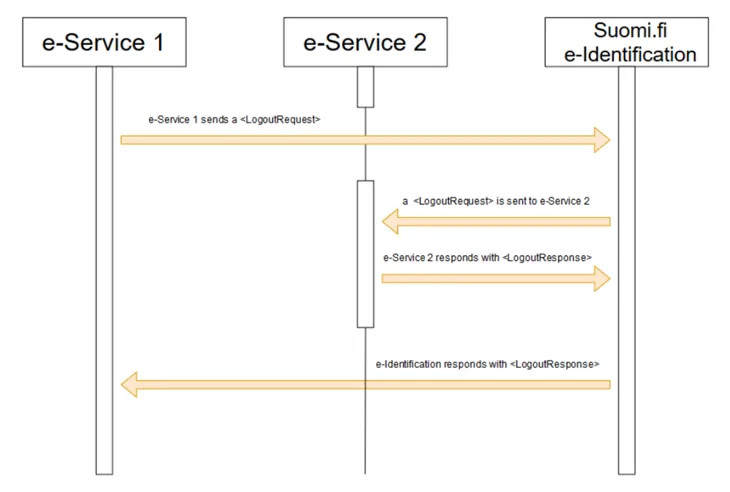
The image below presents the SAML messages that apply to the single log-out that is transmitted between the e-service and the Identification service when the end-user has been logged in to the e-services linked to the Identification.
Logout request
The e-service can send a request for log-out to the Identification service or vice versa (see Figure 3). The message has the same structure in both cases.
The e-service must end the local browser session before sending the logout request to the Identification service.
Supported bindings are HTTP POST and HTTP REDIRECT.
Please note that the logout response is sent to the service that initiates the logout (In case several e-Services are logged out) only after the user clicks the "BACK TO THE E-SERVICE" link.
e-service identifier
Description | e-service identifier refers to the EntityID attribute defined in the e-service's basic data (metadata). |
|---|---|
Placement | saml2p:LogoutRequest-elementets saml2:issuer-element. |
Format | String, max 1024 characters. |
Mandatory | Yes |
Example | <saml2p:LogoutRequest … |
Table 16. e-service identifier, logout.
Timestamp
Description | Time when the logout request is created |
|---|---|
Placement | saml2p:LogoutRequest-element's IssueInstant-attribute |
Format | String, 20 characters. W3C XML Schema definition data type DateTime which has the format "YYYY-MM-DDThh: mm: ss". In UTC format, without time zone. |
Mandatory | Yes |
Example | <saml2p:LogoutRequest … IssueInstant=”2015-09-28T16:27:36Z”…> |
Table 17. Timestamp, logout.
Session identifier
Description | The code that identifies the SSO session created by the Identification service was given and that the e-service received as an identification response. |
|---|---|
Placement | saml2:NameID-element. |
Format | Character string |
Mandatory | Yes |
Example | <saml2p:LogoutRequest … |
Table 18. Session identifier.
Session index
Description | One-time login index information provided for the e-service in the identification response. |
|---|---|
Placement | <samlp:LogoutRequest> |
Format | String |
Mandatory | Yes |
Example | <saml2p:LogoutRequest … |
Table 19. Session index information.
Event code
Description | The event code set by the e-service that enables the preservation of the e-service's status information throughout the logout event. |
|---|---|
Placement | RelayState-parameter |
Format | Max 80 characters |
Mandatory | No |
Example | <form method="post" action=”…. |
Table 20. Event code, logout.
Logout response
The e-service can send a log-out response to the Identification service or vice versa (see Figure 3). The logout response has the same structure in both cases.
If the one-time login session is missing, for example, because the identification was done with eIDAS identification or the session has become obsolete, LogoutREsponse is returned as a logon response with StatusCode "Requester" and StatusMessage "An error occurred".
Supported bindings are HTTP POST and HTTP REDIRECT.
Please note that the logout response is sent to the service that initiates the logout (In case several e-Services are logged out) only after the user clicks the "BACK TO THE E-SERVICE" link.
Timestamp
Description | Time when the logout response was created. |
|---|---|
Placement | saml2p:LogoutResponse-element's IssueInstant-attribute. |
Format | Character string, 20 characters. |
Mandatory | Yes |
Example | <saml2p:LogoutResponse … IssueInstant=”2015-09-28T16:27:36Z” … |
Table 21. Timestamp, the logout response.
e-Service identity
Description | E-service code. Refers to the EntityID attribute defined in the e-service metadata. |
|---|---|
Placement | saml2p:LogoutResponse-element's saml2:issuer-element. |
Format | Character string, length max 1024 characters. |
Mandatory | Yes |
Example | <saml2p:LogoutResponse … |
Table 22. e-service code, the logout response.
Relay State
Description | The event code set by the e-service that enables the preservation of the e-service's status information throughout the logout event. |
|---|---|
Placement | RelayState-parameter. |
Format | Max 80 characters |
Mandatory | No |
Example | <form method="post" action=”…. |
Table 23. Event code, logout response.
Response status
Description | Information about how the log-out event succeeded |
|---|---|
Placement | saml2p:LogoutResponse-element's saml2p:Status-element. |
Format | Character string. Higher level status codes:
|
Mandatory | Yes |
Example | <saml2p:LogoutResponse … |
Table 24. Return status, response to logout request.
Finnish Authenticator
To use Finnish Authenticator in Suomi.fi e-Identification requires a separate contract.
NOTE! Finnish Authenticator is NOT A STRONG IDENTIFYING METHOD.
The following information is communicated about foreign persons identified with the identifier:
First name | http://eidas.europa.eu/attributes/naturalperson/CurrentGivenName |
|---|---|
Family name | urn:oid:2.5.4.4 |
The foreign person's identification code | urn:oid:1.2.246.517.3002.111.17 |
Birth date | http://eidas.europa.eu/attributes/naturalperson/DateOfBirth |
Table 25. Information communicated about foreign persons identified with the identifier.
Finnish Authenticator can be used with the identification tool urn: oid: 1.2.246.517.3002.110.7
Finnish Authenticator can be found (once added to the metadata) behind "Other european identification" -selection.