
Rule engine when acting on behalf of a company (OrganizationalRoles)
Operating principle of the rule engine
The e-Authorizations rule engine can be used to specify whether the assignee has the right to act on behalf of a company, in what roles and on what business. The rule engine is specific to each e-service. Its settings can be used to set the requirements for acting on behalf of another person in e-services that utilise the e-Authorizations service interface.
The customer organization must set and manage the rules of the rule engine in a manner that is suitable for its e-service. The rule engine settings determine what operative roles in basic registers (Trade Register, Business Information System, register of associations, authorization register) and what mandates in the authorization register are transmitted to the e-service as a response to the authorization query.
The application logic of the e-service must interpret the roles and mandates transmitted in the authorization query response message. Based on the response, transactions can be allowed or disallowed. The rule engine does not change the operative roles registered in basic registers or make any decisions regarding them – it forwards them unaltered to the e-service.
Example: MD is selected from rule 015.002.1.1 and the managing director of the company acts on behalf of the company. In this case, the MD role is transmitted to the response to the authorization query. The interface query only returns the roles selected in the rule engine settings, provided that the role in question is found in the basic registers for that person.
The assignee's information is always checked first in the Population Information System (PIS) or UTU register. The actual right to act on behalf of a company may be granted based on information in the Trade Register (Virre), Business Information System (BIS), register of associations or authorization register. Requirements concerning transactions can also be checked using information found in the e-Authorizations company index.
The rule engine rules are either mandatory or optional for the e-service.
Logical description of the rule engine
The e-Authorizations rule engine works as shown in figure below when acting on behalf of a company. The rule engine rules shown in the figure are explained in more detail below.
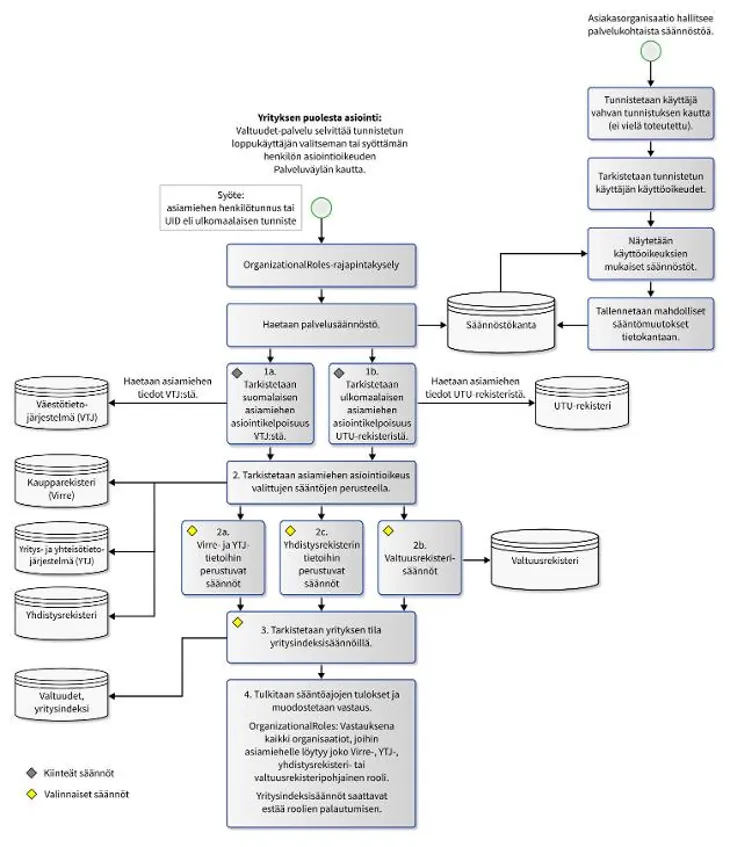 Rule engine rules
Below are the rules which the rule engine goes through when acting on behalf of a company. The numbers for each section refer to the preceding figure.
1. Checking the eligibility of assignees to act on behalf of another person
1a. Checking the eligibility of Finnish assignees in the PIS
When dealing with Finnish assignees, the rule engine checks the Population Information System (PIS) to ensure that
- their personal identification number is valid
- they are alive.
If either of these conditions is not met, the rule engine issues a Disallowed response to the e-service about the assignee's right to act on behalf of the company. If both conditions are met, the rule engine checks the authorization of the assignee.
Table 1a shows information on the eligibility of the assignee to act on behalf of the company. The rule engine checks the information in the Population Information System.
Rule ID | Description | Optionality |
|---|---|---|
001.001.1.1 | checks that the personal identification number is valid | mandatory |
002.001.1.1.2 | checks that the person is alive | mandatory |
Table 1a. Information checked in the Population Information System.
1b. Checking the eligibility of foreign assignees in the UTU register
The rule engine checks the UTU register for the UID level of assurance of foreign assignees (see Table 1b).
Rule ID | Description | UID information (ALLOWED) | Optionality |
|---|---|---|---|
031.008.1.1 | checks the UID level of assurance | validated (LOA = 1) | mandatory |
Table 1b. Information checked in the UTU register.
2. Checking the eligibility to act on behalf of a company based on the selected rules
2a. Rules based on the Virre Information Service and BIS
The rule engine checks the Trade Register (Virre) or Business Information System (BIS)
- to determine what role or roles (e.g. managing director) the assignor has in the company
- to ensure that the assignor has the authority to sign for the company
- to ensure that the assignor's status in the Trade Register is NORMAL (i.e. the assignor is not prohibited from doing business, for example)
- to ensure that the company is not bankrupt, in restructuring and/or in liquidation
- to determine what administrative duties (e.g. chairperson) the assignor has in the company.
Table 2a1 shows the information on the assignor and company that the rule engine checks in the Trade Register or Business Information System.
Rule ID | Impact of the rule on return value in SOAP response |
|---|---|
015.002.1.1 | Roles that involve acting on behalf of another person that may be returned by the rule (see Tables 2a3 and 2a4 for more detailed information):
If Business IDs are given in the authorization query, operative roles will only be shown in the response for the companies/organizations in question. |
016.002.1.2 | Roles that involve acting on behalf of another person that may be returned by the rule:
At both levels, an NIMKO role is added to the authorization query response if the person has the right to represent the company on their own (acting alone as a signatory) for either level. |
017.002.1.3 | If the rule has been selected and the status of the person in the Trader Register is other than NORMAL, an empty list is returned as response. |
018.002.1.4 | If the rule has been selected and the status of the company in the Trade Register is "Bankrupt", "In restructuring" and/or "In liquidation", the company will be removed from the response list. |
022.002.1.5 | Roles that involve acting on behalf of another person that may be returned by the rule (Table 2a3):
|
Table 2a1. Information checked in the Trade Register or Business Information System.
The rule engine also checks the Business Information System (BIS) to see whether the assignor is a private trader (see Table 2a2).
Rule ID | Decision rule |
|---|---|
020.004.1.1 | If the person is a private trader according to the query, the abbreviation ELI will be added to their operative roles. The rule cannot be directly selected. This is done automatically if operative role rule 015.002.1.1 has been selected to check the ELI role. |
Table 2a2. Information checked in the Business Information System.
Abbreviations for operative roles
Table 2a3 shows abbreviations for operative roles used in rules based on information in the Trade Register.
Operative role | Abbreviation |
|---|---|
Trader | ELI |
Building manager | IS |
Member | J |
Chairperson | PJ |
Full-time building manager | PIS |
Liquidator | S |
Auditor | TIL |
Managing director | TJ |
Managing director's substitute | TJS |
Partner | YHM |
Table 2a3. Abbreviations for operative roles.
Roles in the interface service
Rules 015.002.1.1 and 022.002.1.5 described above apply to the roles in the interface service (see Table 2a4).
Roles in the interface service | Operative role |
|---|---|
ELI | ELI |
IS | IS, PIS |
J | J |
PJ | PJ |
S | S |
TIL | TIL |
TJ | TJ, TJS |
YHM | YHM |
Table 2a4. Roles and operative roles in the interface service.
2b. Authorization register rules
The rule engine checks the authorization register for the matters in which the assignee is authorized to act on behalf of the company.
Only mandate themes selected under this rule are included in the response to the authorization query via the rule engine. Only mandate themes authorized by the e-Authorizations service implementation team may be selected with the rule engine. You can request the authorization of mandate themes for the rule engine from the implementation team at valtuudet-kayttoonotot@dvv.fi. The response to the authorization query includes the mandate theme's technical identifier (URI), which is shown after the name of the mandate theme in the rule engine.
Table 2b shows the information that the rule engine checks in the authorization register.
Rule ID | Decision rule |
|---|---|
019.003.1.2 | The assignee is considered to have a mandate in the register if a company has granted them a mandate in Suomi.fi e-Authorizations. |
Table 2b. Information checked in the authorization register.
2c. Register of associations rules
The rule engine checks the register of associations to see what administrative duties the assignor has in the association and whether they have the authority to sign for the association.
Table 2c shows the information the rule engine checks in the register of associations.
Rule ID | Impact of the rule on return value in SOAP response |
|---|---|
029.007.1.1 | Roles that involve acting on behalf of another person that may be returned by the rule:
|
030.007.2.1 | Roles that involve acting on behalf of another person that may be returned by the rule:
|
Table 2c. Information checked in the register of associations.
3. Checking the company status with company index rules
The rule engine checks the company status in the e-Authorizations company index in accordance with Table 3. The e-Authorizations company index is a company database based on the Business Information System (BIS).
Rule ID | Decision rule |
|---|---|
024.005.1.1 | Acting on behalf of the company is denied if the company is not operational and this rule is selected. |
025.005.1.1 | Acting on behalf of the company is denied if the company status is one of the selected. |
Table 3. Information checked in the e-Authorizations company index
4. Interpreting the rule run results and generating a response
When the rule engine has checked all necessary information in different registers and information systems, the response will include all organizations in which the assignee has a role. In other words, the role may be based on information in the Trade Register, Business Information System, register of associations and/or authorization register. Information in the e-Authorization company index can, however, deny a person the right to act on behalf of an organization in a certain role.