
Technical interface description (SAML)
General technical characteristics of the service
The API is using SAML 2.0. Messages are deflated and Base64 encoded before they are transmitted.
Technical connection
The e-service is connected to the Identification service by submitting the basic information (metadata) to the Identification Administration. Familiarize yourself with the e-service's metadata in the Identification service.
The Identification service and the e-service sign the SAML 2.0 messages they send, so to ensure the origin, the recipient must have the sender's public key (in the certificate). In connection with the connection, the Identification Certificate is uploaded to the e-service server. The e-service's certificate is communicated to the Identification as part of the e-service's basic information (metadata).
The exchange of SAML-messages
SAML messages between the Identification service and the e-service go through the end-user's browser with the HTTP standard commands GET and POST. The standard SAML 2.0 determines, how the SAML message is conveyed in the respective HTTP command.
The e-service calls the Identification service to send an identification request message containing a return address to the end-user's browser with the GET or POST command. The Identification service allows the end user to identify themselves in any way. The Identification service sends a response message to the e-service's return address with the POST command. The assertions in the response message are encrypted with symmetric encryption, where the encryption key is asymmetrically encrypted with the public key found in the service’s metadata.
Message traffic is encrypted with TLS, ie. all calls and response messages are transmitted via HTTPS connection. The e-service should ensure that all connections between the end-user's browser and the e-service are HTTPS encrypted.
The part of the response message containing personal data is encrypted with symmetric encryption, where the encryption key is asymmetrically encrypted with the public key found in the e-service’s metadata. The e-service service must define the key used for encryption in its metadata with the purpose “encryption” or by leaving the key’s purpose undefined.
The Identification service is called over an HTTPS connection. The return address provided by the e-service in its message shall utilize the HTTPS protocol.
All SAML messages are signed to ensure the sender, the integrity and the immutability of the message. The parties shall check the signing of the messages they receive.
Testing
It is easier to connect to the Identification service if you have access to a tool that opens SAML messages. There are extensions for the browsers, such as "SAML tracer" for Firefox, "SAML Chrome Panel" and "SAML Message Decoder" for Chrome.
Identification
The identification of the end-user in the Suomi.fi-identification is a SSO login to all the e-services linked to the Suomi.fi-identification.
An example of an identification event
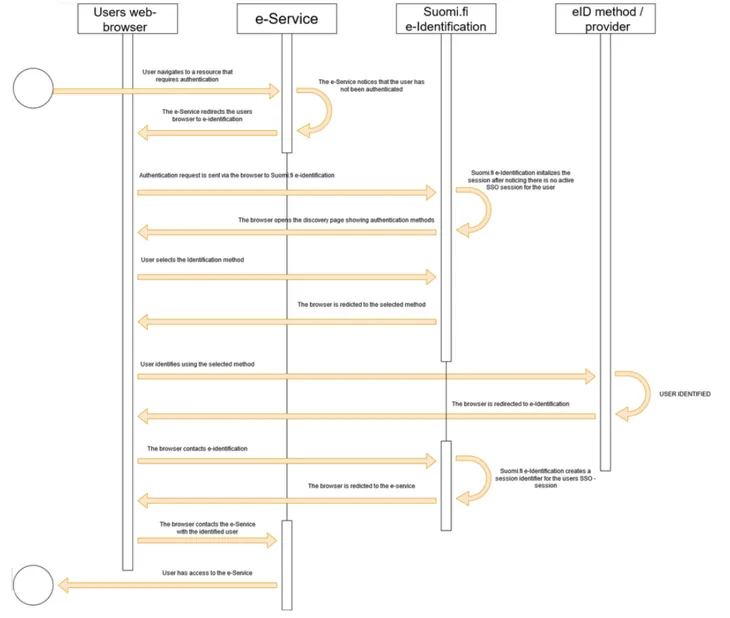
- The e-service notices that the end user has not been identified.
- The e-service directs the end user to the Identification service and sends a SAML request for identification to the browser.
- The end-user browser forwards the SAML identification request to the Identification service.
- The Identification service receives the SAML request for identification and returns to the browser a page where identification tools can be selected.
- The end user selects the desired identification method and identifies.
- The provider of the identification tool directs the browser back to Suomi.fi-identification.
- The browser communicates the identification tool to to Suomi.fi-identification along with the end user identification code provided by the provider.
- to Suomi.fi-identification creates a SSO session and creates a SAML message that contains the end-user information and communicates the message to the browser while to Suomi.fi-identification directs the browser back to the e-service.
- The browser communicates the personal information contained in the SAML identification response to the e-service, which initiates a session for the identified end user.
- The e-service returns the protected resource to the end user as requested.
The e-service can create the authentication request, for example by providing the browser with an HTML form that contains a SAML message in the hidden fields. The form can send a script that is executed automatically or the end user sends it by clicking the form's submit button.
...
  <form name=”APRO” method=”POST” action= ”https://testi.apro.tunnistus.fi/idp/profile/SAML2/POST/SSO">
 <input type=”hidden” name=”SAMLRequest” value=”fZJBU8I...”/>
 <input type=”hidden” name=”RelayState” value=”ss%3Amem%3Ac3”/>
 <input type=”hidden” name=”SigAlg” value”=http%3A%2F%2Fwww.w3.org%2F2001%2F04%2Fxmldsig-more%23rsa-sha256”/>
 <input type=”hidden” name=”Signature” value=”sO%2Fw..”/>
 </form>
...
var form = document.APRO;
form.submit();
...
<input type="submit" value="Siirry tunnistautumaan">
In the examples below, the following name definitions used throughout SAML 2.0 messages are used to convey data content.
xmlns:saml2="urn:oasis:names:tc:SAML:2.0:assertion"
xmlns:saml2p="urn:oasis:names:tc:SAML:2.0:protocol"
Authentication request
The information that controls the identification request is defined in the basic information (metadata) that the e-service provided to the Identification when connected to the service.
By customizing the content of the authentication request, you can influence the user interface visible to the user and the response message. For example, in the authentication request, you can choose the language that Suomi.fi-identification should use in its interface, which authentication methods are shown to the end user, and where the user’s browser is directed after the authentication event.
Supported bindings are HTTP POST and HTTP REDIRECT.
The identification request must be signed (using at least the SHA256 level algorithm).
e-service identity
Description | E-service code. Refers to the EntityID attribute defined in the e-service metadata. |
|---|---|
Placement | saml2p:AuthnRequest -elements saml2:issuer-element |
Format | Character string, length max 1024 characters. |
Madatory | Yes |
Example | <saml2p:AuthnRequest …> |
Table 1. e-service code, identification request.
Return address of the e-service
Description | The destination address of the message, i.e. the Identification address service. Determined in the identification metadata per connection. |
|---|---|
Placement | saml2p:AuthnRequest-elements attribute Destination. |
Format | Character string |
Mandatory | Yes |
Example | <saml2p:AuthnRequest … Destination=”…” |
Table 2. Return address, identification request
Time stamp
Description | Time when the authentication request was created. |
|---|---|
Placement | issueInstant-attribute for element saml2p:AuthnRequest. |
Format | Character string, 20 characters. |
Mandatory | Yes |
Example | <saml2p:AuthnRequest… IssueInstant=”2015-09-28T16:27:36Z”…> |
Table 3. Timestamp, authentication request.
User interface language
The interface language is determined by the language selection of the first authentication request in the same session. In other words, if the first service you authenticate to sets the language to Swedish, the interface language will also be Swedish when logging into another service (regardless of the language chosen for the authentication request in the subsequent services). This selection continues until you log out.
Description | User interface language. |
|---|---|
Placement | saml2p:Extensions-element's |
Format | Character string, 2 characters. This method should only be used if, for technical reasons, the language code cannot be included in the SAML message. |
Mandatory | No |
Example | <saml2p:AuthnRequest |
Table 4. User interface language, identification request.
The return address of the e-service or a reference to the return address
Description | The return address of the e-service or a reference to the return address |
|---|---|
Placement | saml2p: The AuthnRequest element attribute AssertionConsumerServiceURL or attirbut AssertionConsumerServiceIndex. |
Format | A URL whose protocol must be HTTPS, otherwise the Identification service will reject the message (using the Requester error code). |
Mandatory | No |
Example | <saml2p:AuthnRequest ... AssertionConsumerServiceURL=”https://kalastus.kunta.fi/SAML2/POST"or
|
Table 5. Return address of the e-service or a reference to the return address, the identification request.
Event code
Description | The event code set by the e-service that enables the preservation of the e-service's status information throughout the identification event. |
|---|---|
Placement | RelayState-variable. |
Format | Max 80 characters. |
Mandatory | No |
Example | <form method="post" action=”…. |
Table 6. Event code, identification request.
Approved identification methods
Description | In the identification request, the E-service can limit the group of defined identification methods in the metadata by providing a list of permitted levels of trust and tools. |
|---|---|
Placement | saml2:AuthnContextClassRef-element in saml2p:RequestedAuthnContext-element. |
Format | String with the possible values
In the test environment also
|
Mandatory | No |
Example | In the AuthnRequest messages expressed by the elevated confidence level and tools:
In the AuthnRequest messages expressed by the high level of trust: <saml2p:AuthnRequest |
Table 7. Approved identification tools, identification request.
Processing of the code
Description | Identification of the authentication event |
|---|---|
Placement | saml2p:NameIDPolicy-element in saml2p:AuthnRequest-element. |
Format | Attribute AllowCreate and Format. |
Mandatory | Yes |
Example | <saml2p:AuthnRequest |
Table 8. Processing of the code, identification request.
Identification response
The Identification service returns, in response to the identification, the information about the identified end user. In addition to the identity, for example, the e-service can obtain the end-user's name information and updated contact information from the population data system.
The return response is encrypted. The default algorithm used for encryption is AES-GCM.
Encryption can be configured with either AES-CBC or AES-GCM algorithms. Please note that the use of AES-CBC is not recommended. The setting is defined in the Service Provider metadata registered for Suomi.fi e-identification.
- The information communicated about an identified end-user with a Finnish identification tool
- The information conveyed about a user who has identified himself with eIDAS
Timestamps
Description | Time when the identification response is created. |
|---|---|
Placement | saml2p:Response-element's IssueInstant-attribut. |
Format | Character string, 20 characters. |
Mandatory | Yes |
Example | <saml2p:Response … |
Table 9. Time stamping, identification response.
Event code
Description | The event code that the e-service sends in the identification call that enables the preservation of the e-service's status information throughout the identification event. |
|---|---|
Placement | RelayState-parameter. |
Format | Max 80 characters. |
Mandatory | No |
Example | <form method="post" action=”…. |
Table 10. Event code, identification response.
Session identifier
Description | The single sign on session code created by the Identification service. |
|---|---|
Placement | saml2:NameID-element. |
Format | Text string max 1024 characters. |
Mandatory | Yes |
Example | <saml2p:Response … |
Table 11. Session identifier, authentication response.
Session index
Description | Session index for SSO |
|---|---|
Placement | SessionIndex-attribute value |
Format | String |
Mandatory | Yes |
Example | <saml2:AuthnStatement AuthnInstant="2016-05-13T11:42:42.573Z" SessionIndex="_2c41c54f41a76ec6aaeede9a9bc46a24"> |
Table 12. Session index for the SSO session.
The strangth of the authentication
Description | The identification strength level |
|---|---|
Placement | saml2:AuthnStatement-elementets saml2:AuthnContext-elements saml2:AuthnContextClassRef-element. |
Format | As a value, a code is returned in URN: OID format.
|
Mandatory | Yes |
Example | <saml2p:Response … |
Table 13. The strength of the identification event, the identification response.
Return status
Description | The return status of the authentication request |
|---|---|
Placement | saml2p:Response-element´s saml2p:Status-element. |
Format | String. |
Mandatory | Yes |
Example | <saml2p:Response … |
Table 14. Return status, authentication response.
Population register search successful
Description | The e-service is informed about the success of the PRS success. |
|---|---|
Placement | saml2p:Response-elements saml2p:Status-element. |
Format | String
|
Mandatory | Yes |
Example | <saml2:Attribute Name="urn:oid:1.2.246.517.3002.111.2" NameFormat="urn:oasis:names:tc:SAML:2.0:attrname-format:uri"> |
Attn. | Identification when population data system is umnvailable is defined by giving the value VtjVerificationRequired the value "false" in the metadata. By default, the element is added to the metadata with the value "true". |
Table 15. Status of the PRS -search.
Sign out
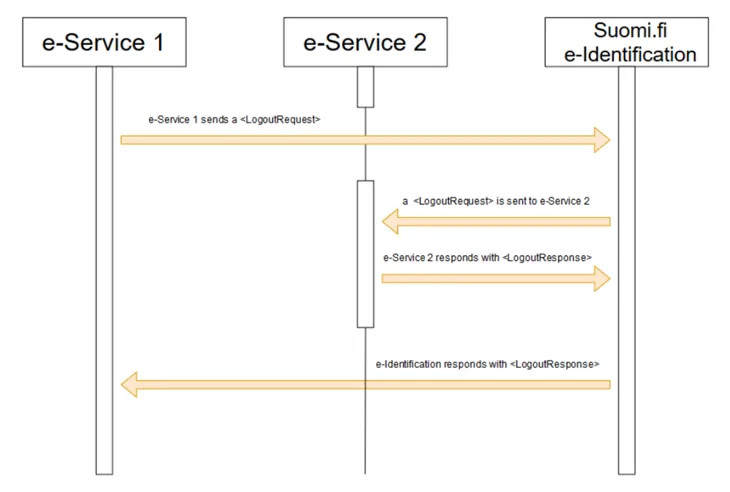
The image below presents the SAML messages that apply to the single log-out that is transmitted between the e-service and the Identification service when the end-user has been logged in to the e-services linked to the Identification.
Logout request
The e-service can send a request for log-out to the Identification service or vice versa (see Figure 3). The message has the same structure in both cases.
The e-service must end the local browser session before sending the logout request to the Identification service.
Supported bindings are HTTP POST and HTTP REDIRECT.
Please note that the logout response is sent to the service that initiates the logout (In case several e-Services are logged out) only after the user clicks the "BACK TO THE E-SERVICE" link.
e-service identifier
Description | e-service identifier refers to the EntityID attribute defined in the e-service's basic data (metadata). |
|---|---|
Placement | saml2p:LogoutRequest-elementets saml2:issuer-element. |
Format | String, max 1024 characters. |
Mandatory | Yes |
Example | <saml2p:LogoutRequest … |
Table 16. e-service identifier, logout.
Timestamp
Description | Time when the logout request is created |
|---|---|
Placement | saml2p:LogoutRequest-element's IssueInstant-attribute |
Format | String, 20 characters. W3C XML Schema definition data type DateTime which has the format "YYYY-MM-DDThh: mm: ss". In UTC format, without time zone. |
Mandatory | Yes |
Example | <saml2p:LogoutRequest … IssueInstant=”2015-09-28T16:27:36Z”…> |
Table 17. Timestamp, logout.
Session identifier
Description | The code that identifies the SSO session created by the Identification service was given and that the e-service received as an identification response. |
|---|---|
Placement | saml2:NameID-element. |
Format | Character string |
Mandatory | Yes |
Example | <saml2p:LogoutRequest … |
Table 18. Session identifier.
Session index
Description | One-time login index information provided for the e-service in the identification response. |
|---|---|
Placement | <samlp:LogoutRequest> |
Format | String |
Mandatory | Yes |
Example | <saml2p:LogoutRequest … |
Table 19. Session index information.
Event code
Description | The event code set by the e-service that enables the preservation of the e-service's status information throughout the logout event. |
|---|---|
Placement | RelayState-parameter |
Format | Max 80 characters |
Mandatory | No |
Example | <form method="post" action=”…. |
Table 20. Event code, logout.
Logout response
The e-service can send a log-out response to the Identification service or vice versa (see Figure 3). The logout response has the same structure in both cases.
If the one-time login session is missing, for example, because the identification was done with eIDAS identification or the session has become obsolete, LogoutREsponse is returned as a logon response with StatusCode "Requester" and StatusMessage "An error occurred".
Supported bindings are HTTP POST and HTTP REDIRECT.
Please note that the logout response is sent to the service that initiates the logout (In case several e-Services are logged out) only after the user clicks the "BACK TO THE E-SERVICE" link.
Timestamp
Description | Time when the logout response was created. |
|---|---|
Placement | saml2p:LogoutResponse-element's IssueInstant-attribute. |
Format | Character string, 20 characters. |
Mandatory | Yes |
Example | <saml2p:LogoutResponse … IssueInstant=”2015-09-28T16:27:36Z” … |
Table 21. Timestamp, the logout response.
e-Service identity
Description | E-service code. Refers to the EntityID attribute defined in the e-service metadata. |
|---|---|
Placement | saml2p:LogoutResponse-element's saml2:issuer-element. |
Format | Character string, length max 1024 characters. |
Mandatory | Yes |
Example | <saml2p:LogoutResponse … |
Table 22. e-service code, the logout response.
Relay State
Description | The event code set by the e-service that enables the preservation of the e-service's status information throughout the logout event. |
|---|---|
Placement | RelayState-parameter. |
Format | Max 80 characters |
Mandatory | No |
Example | <form method="post" action=”…. |
Table 23. Event code, logout response.
Response status
Description | Information about how the log-out event succeeded |
|---|---|
Placement | saml2p:LogoutResponse-element's saml2p:Status-element. |
Format | Character string. Higher level status codes:
|
Mandatory | Yes |
Example | <saml2p:LogoutResponse … |
Table 24. Return status, response to logout request.
Finnish Authenticator
To use Finnish Authenticator in Suomi.fi e-Identification requires a separate contract.
NOTE! Finnish Authenticator is NOT A STRONG IDENTIFYING METHOD.
The following information is communicated about foreign persons identified with the identifier:
First name | http://eidas.europa.eu/attributes/naturalperson/CurrentGivenName |
|---|---|
Family name | urn:oid:2.5.4.4 |
The foreign person's identification code | urn:oid:1.2.246.517.3002.111.17 |
Birth date | http://eidas.europa.eu/attributes/naturalperson/DateOfBirth |
Table 25. Information communicated about foreign persons identified with the identifier.
Finnish Authenticator can be used with the identification tool urn: oid: 1.2.246.517.3002.110.7
Finnish Authenticator can be found (once added to the metadata) behind "Other european identification" -selection.