
Technical interface description
The article presents the technical interface description and the operating environment for Suomi.fi identification, a general description of the service's operations and the general technical characteristics.
Suomi.fi-identification environment
The identification service offers the e-services identification of the end user via an interface. For the end user, the Identification creates an opportunity to choose the appropriate identification method and a one-time login to the e-services linked to the Identification.
The e-service can limit the permitted identification tools that the end user can use to identify themselves. If the end-user has been strongly authenticated, the Identification service complements the user's data from the population data system.
The image below describes the business environment of the Identification.
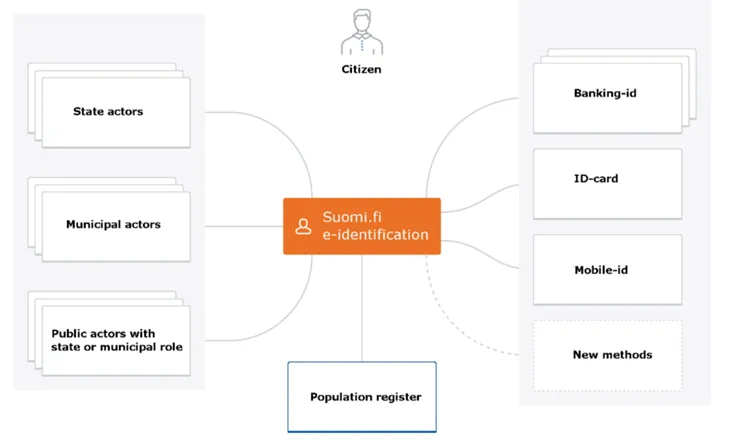
A general description of the Identification business service
The e-service uses the Suomi.fi identification to identify the user. The Suomi.fi identification shows the user the identification tools providers approved by the e-service and the user chooses the identification that best suits.
For Finnish identification tools, the Identification service in the population data system checks that the identified end-user has an active social security number and that the owner is alive and complements the end-user's data from the population data system.
For eIDAS-identified users, the individualizing PID code and name and birth time information are communicated and the user is directed to the e-service. For these users, the data cannot be supplemented by the population data system.
The identification tool "urn: oid: 1.2.246.517.3002.110.7" returns the identification code, date of birth and name information of the identified user.
HTTPS connections are used to protect the data communications used to identify the end user and the identities of the parties.
Identification security levels
The identification uses the confidence levels for the identification that have been determined in accordance with FICORA's definitions of the trust level network. Trust level refers to how "strong" the identification tool is, ie. the level of trust in the identity information it offers. The e-services themselves determine what the appropriate level of identification is. Tools in addition to the strong tools should be selected one at a time.
A description of the confidence levels:
- High level of trust - the highest level of strong authentication. Finnish SecID card, is on this level.
- Elevated trust level - an elevated trust level for strong authentication. Hightrust.id, Banking ID and mobile ID identifiers on this level.
- No confidence level - some of the identification tools have not been set for any level of trust and they are determined separately.
The confidence levels of the identification also apply to the European eIDAS identification. High and elevated confidence levels defined in Finland correspond to their definitions of the high (high) and elevated (substantial) confidence levels of the eIDAS identification.
From September 2018, the confidence levels of eIDAS identification must be defined as approved in addition to the confidence levels of the Finnish trust network. The response that is communicated about the identification events to the e-service depends on the level of trust of the trust network or the level of confidence of the eIDAS identification, depending on whether the user has identified himself with a Finnish identification tool or with the eIDAS identification.
Single Sign On and Single Logout
The Identification service creates a SSO login session for the end user that allows all e-services connected to the Identification with the same login to use. The SSO session is valid for 32 minutes. The e-service may choose its own session time regardless of the Suomi.fi session time.
For the SSO, the e-services' approved tools and confidence levels are utilized. Access to the e-service without re-identification is possible only if the level of confidence or the tool used to create the session corresponds to at least that established for the e-service.
The e-service associated with the Identification service must support SSO. When the end user logs out, the other sessions that belong to the same SSO session are also terminated. The e-service must be able to both initiate the log-out process and handle the log-out request that comes from the Identification. Local logout should be done before sending the SLO request to Suomi.fi.
Service provider can't send the SLO-message in back-channel, because at logout the user will be shown the SLO status information of all services that were logged in to using the same SSO-session and the user must confirm the check-out manually.
Due to the technical implementation of Suomi.fi e-Identification, the SLO-response is transmitted from the e-service in iframe. The e-service must allow this in its own settings. (Content-Security-Policy: frame-Ancestors 'self' https://tunnistautaminen.suomi.fi;)
No SSO session is created when the user has logged on with eIDAS identification. Then the user is forced to re-identify when navigating to another e-service.
End user environment requirements
The Identification service is intended for use in web browsers. Its interfaces are used by browsers in the same way as the interfaces of the identification tools used for identification.
The Identification service can be used with different language options (Finnish, Swedish or English).
The use of the Identification service does not require the end user to install any programs on his workstation. However, the identification tools used to identify the end user may require additional components such as a certificate card reader.
End users web-browser
Requirements for the end users browsers:
- the Identification service has been created according to the HTML 5.0 standard, but also works with a scaled-down appearance if the browser does not support the HTML 5.0 standard
- the Identification service requires the approval of session cookies (HTTP session cookies) and JavaScript in the browser
- the Identification service uses TLS version 1.2 and 1.3.
The use of identification tools
The identification methods used may require the end user to use specific tools or programs:
- For example, the bank codes can be based on a key code list or a mobile application.
- Identification with a certificate card granted by the Agency for Digitization and Population. Data (eg an identity card, social and health care activity card, organizational card) is done with the help of a card reader and a card program installed on the workstation.
- Identification based on mobile ID uses the operator's SIM card and the mobile phone.
- Hightrust.id - A certificate card and a mobile application downloaded from the app store are required to activate the wallet application.
Mobile device support
The Identification UI service works with a web browser. The service can also be used with mobile devices with the limitations presented under the section End users web-browser. Different identification tools may place restrictions on the use of mobile devices.