
How to submit an application for a FSC user permit
These instructions are for people submitting an application for a user permit. If you want to bring data to FSC from an external source read first the page How to deploy the IN-interface.
1. Agree in the organisation on who will submit the application
An application for a user permit can be submitted either by the agreed person in the FSC’s user organisation or by an IT supplier’s representative as an intermediary. Agree among you on which one will submit the application.
2. Log into Suomi.fi Service Management
Go to Suomi.fi Service Management Opens in a new window.and identify yourself strongly in the service.
3. Register
First, search the business ID to check whether your organisation has already been registered in Suomi.fi Service Management.
If your organisation has not previously dealt with Suomi.fi Service Management, register the details of your organisation and your own details.
If your organisation has already established a customer account for the Service Management in relation to the implementation of another Suomi.fi service, send a request to your organisation’s main user of the Service Management to invite you to the Service Management as your organisation’s user of the Service Management.
Instructions for registration in the Service Management
4. Respond to the background survey
5. Fill in the user permit application form
The user permit application has three sections:
- Details of the organisation and the contact persons
- Details of the information system that will be connected and a description of how the information will be secured (when using the IN-interface)
- Commitments made by the organisation
If you want to produce information through the FSC user interface, fill in only the first and third section of the user permit application (Details of the organisation and the contact persons and Commitments made by the organisation).
If you want to import data to the FSC through the IN-interface from another system, also fill in section 2 (Details of the information system to be connected and the data protection description.)
If necessary, fill in all sections.
If your organisation uses an external application supplier, fill in the contact details of the supplier's technical contact person in the 'Technical contact person' field in the permit application. This way, the supplier is assigned an API ID for your organisation’s integration. If your organisation’s application supplier already has an API user ID for Production FSC, state it in the user permit application.
5b If your organisation has already implemented the FSC and applies for an IN-interface user permit afterwards
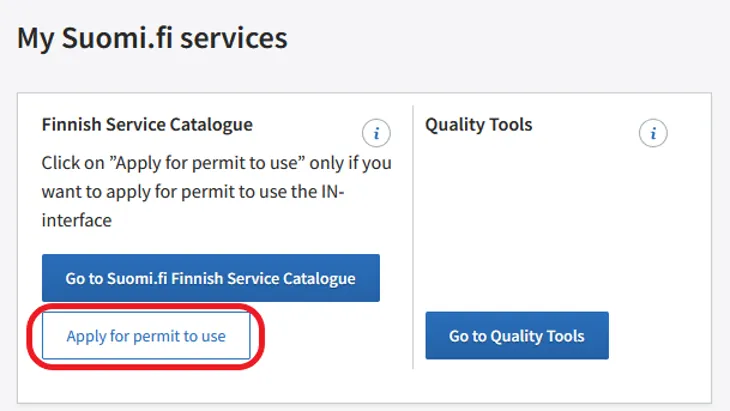
If your organisation has already taken the Suomi.fi Finnish Service Catalogue into use, apply for an IN-interface user permit on the front page of the user logged in to the Service Management. Click the Apply for a user permit button and fill in the form that appears.
6. Accept the terms of use
When filling in the user permit application, you will also accept the terms and conditions of use of the service. By accepting the terms and conditions of use, your organisation undertakes to provide content according to instructions and quality requirements.
7. Processing and approval of the application
Once you have submitted your application, it will take approximately 1–2 weeks to process it. You can view the application you have submitted on the Service Management’s website under Applications. The decision will also be under Applications.
Once the user permit application has been processed, you will receive a message about granting the permit. You now have a main user’s rights to the Service Management and can invite new people to your organisation. You are also the FSC main user of your organisation.
Read more about user rights on the Work organisation page