
How to deploy the IN-interface
Integration from another system to the FSC requires a user permit application.
If you are implementing an entirely new IN integration with the FSC, follow the "Basic guide for enabling IN integration".
If you are deploying an IT supplier's ready-made IN integration with the FSC (e.g. Pinmeto or Fonecta Connect), follow the "IN integration from an IT supplier's system to the FSC" guide.
If you maintain your organisation's sports facility data in the LIPAS system and want to import the data to the FSC, follow the "IN integration from LIPAS.fi to the FSC" guide.
If you do not know which instructions to follow, please contact ptv-tuki@dvv.fi.
Instructions for deploying the IN interface
Ensure the prerequisites for commissioning the IN-interface
Your organisation can only implement an IN integration with the FSC if it has its own system where the data is
- up to date
- described in a customer-oriented manner
- and structurally compatible with the FSC data model.
If the systems are very different or the source system data is not regularly maintained, the IN-integration may not be implemented. Such integrations are expensive, difficult to maintain and result in a significant number of technical fault investigations that strain both the customer and the Digital and Population Data Services Agency.
Make a data model mapping
At the beginning of the integration implementation, your organisation must prepare a data model mapping between the source system and the FSC to ensure that the data are commensurate. Read more about FSC's data model.
Sufficient time and resources should be reserved for this to ensure effective integration and to avoid unnecessary disruptions in the production phase and poor-quality data that cannot be utilised further. Please involve the people responsible for the quality and customer orientation of FSC data in the process.
Be prepared to develop the source system
If your organisation’s source system data does not fully comply with the FSC’s data model or quality requirements, but you still want to implement the IN-integration, your organisation must be prepared to develop its system or improve its data quality to be compatible with the FSC before implementing the integration. For example, you need to add any missing mandatory data fields to the system and change the records to the same format as in the FSC.
Another option is to generate data for some missing text fields mechanically. If this is the case, your organisation must ensure that the data produced is customer oriented.
Apply for a user permit
Apply for a user permit according to the instructions on page How to submit an application for a user permit.
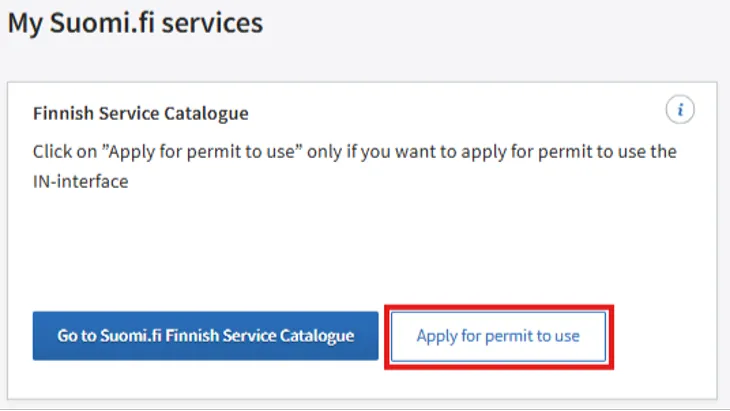
If your organization has already activated the Suomi.fi Finnish Service Catalogue and you only need an IN integration user permit, you can submit your permit application as a strongly identified user in the Suomi.fi Service Management dashboard by clicking on the Apply for user permit button under Suomi.fi Finnish Service Catalogue.
Ensure that up-to-date information is transferred
The integration must be implemented in such a way that changes made in the source system’s data are regularly imported to the FSC. In addition, the quality and timeliness of all services and service channels in the source system must be checked regularly, but at least once a year.
Provide training for the FSC users
It is important for the content producers of the source system to understand that once the integration is complete, the contents they describe are also transferred to the FSC and they must be FSC compatible. All of your organisation’s users must be trained and you must update your internal guidelines.
Implement and test the integration
You can find instructions for implementing and testing the IN-integration on the page Technical documentation for the integration’s implementer.
Once the integration is complete, your organisation must test its technical readiness and submit a test report to the Digital and Population Data Services Agency.
Check the content and quality of the data
Your organisation’s FSC Main user must check the substance of the data sent through the interface, correct any errors in the source system and submit a test report to the Digital and Population Data Services Agency.
Read more on the page Content production through the IN-interface.
Make the possible repairs and production installation
Based on the test reports, the Digital and Population Data Services Agency assesses whether your organisation can be granted IN-interface production IDs. This may require several iteration rounds.
Once the Digital and Population Data Services Agency has approved the test reports, the Agency will send the API user rights to the FSC Production Environment to your organisation’s or application supplier’s address specified in the user permit application. You can then perform the production installation.
These instructions are intended for an organisation intending to deploy a system pre-integrated into the FSC through the IN interface, such as a contact information management system (incl. Fonecta's Kontakti Pro or PinMeTo)
Go to submit an application for an IN interface user permit
If your organisation has not yet activated Suomi.fi Finnish Service Catalogue, apply for a user permit as explained on the page How to submit an application for a FSC user permit.
If your organisation has already activated the Suomi.fi Finnish Service Catalogue and you only need an IN integration user permit, you can submit your permit application as a strongly identified user in the Suomi.fi Service Management dashboard by clicking on the Apply for user permit button under Suomi.fi Finnish Service Catalogue.
Complete the user permit application
The user permit application has five sections:
- The organisation's basic information (name, business ID and address)
- Details of the organisation's contact persons
- Information about the FSC IN interface and details of the information system to be connected
In the section on the details of the information system to be connected, indicate which system has been used to implement the IN integration your organisation will deploy and the subcontractor (IT service provider) whose integration will be used.
Also provide the subcontractor’s API ID and the contact details of the API ID holder.
4. Accept the terms and conditions
5. Preview and submit the user permit application
Issue and notification of the user permit
Depending on the queue, the processing of a user permit application takes 1 to 2 weeks. Once the user permit has been issued, it will be displayed in your organisation’s account in Service Management, and DVV’s user permit team will send a message to the contact persons listed in the application and to your organisation’s possible existing FCS Main users with instructions for checking the quality of the data that will be imported to the FSC in the integration. You will receive the actual IN interface production APIkey once the content imported via integration has been successfully reviewed.
Granting of FSC Main user rights
FSC support will now add FSC Main user rights to your contact person and inform the contact person of this by e-mail.
Check and correct content in the source system
With the IT service provider, decide how you will produce your organisation’s content for the system to be integrated into the FSC. If your organisation has described content in the FSC user interface, one option is to retrieve the current content from the FSC’s OUT interface and update it.
Once the content for the system to be integrated into FSC has been produced, an FSC Main user and/or the IT service provider's representative must review it and check that it is compliant with the FSC data model and content production instructions. Data with errors must be corrected in the source system.
All those who maintain data in the system to be integrated into the FSC must also know how to produce and maintain data in the format required by the FSC’s data model and content production instructions.
Submit a content report for review
When the content is comprehensive and up to date, your IT service provider must import the data to the FSC’s Customer Test Environment, run an Excel report on them, and submit it to the Digital and Population Data Services Agency for review at ptv-tuki@dvv.fi.
Content review
DVV reviews the data and checks that they are of high quality and compliant with the data model. You should also be prepared to make any corrections to the content after the review.
API key delivery
Once the necessary corrections to the content have been made, the Digital and Population Data Services Agency will generate a production API key for your organisation for importing the data to the FSC and deliver it to your IT supplier. You can then proceed to the production installation.
Connect service channels and services to the FSC
In the Suomi.fi Finnish Service Catalogue, each service channel must be connected to services offered through the service channel. The services connected to the service channels imported from the system to be integrated into the FSC must be described well in advance in the FSC user interface if this has not been done already. Once the integration is in production, you must connect the services to the service channels in the user interface. Each service channel must be connected to at least one service.
If you want to deploy the integration between the LIPAS sports facility database and the FSC, apply for an FSC-IN interface user permit on the Service Management websiteOpens in a new window..
If your organisation has already deployed the Finnish Service Catalogue, you can apply for an IN interface user permit via the logged-in user's home page in Service Management through the Apply for user permit button.
Filling in the user permit application
The user permit application has three sections:
- Information on the organisation and the contact persons.
- Information on the data system to be integrated to the FSC through the IN interface and a data protection description.
- Commitments made by the organisation (incl. Acceptance of the terms and conditions).
In the technical contact person section, enter the contact person for the University of Jyväskylä (tapani.j.laakso@jyu.fi and lipasinfo@jyu.fi). In the subcontractor section, make a note that you will be using the University of Jyväskylä API key API@jyu.fi and enter the University of Jyväskylä's business ID 0245894-7.
Issue and notification of the user permit
Depending on the queue, the processing of a user permit application takes 1 to 2 weeks. Once a user permit has been granted, it will appear in your organisation’s account in Service Management.
Granting user permits
After receiving your user permit, FSC support will verify your organisation’s FSC main user, add main user access to the administrative contact person in the application, and include your organisation in the University of Jyväskylä’s API key.
After FSC support has carried out these measures, it will email the contact persons in the application and your organisation’s FSC main users.
Additionally, they will send your organisation’s organisation ID, which has been created on the Service Management website during this process, to the University of Jyväskylä, which they need to import the data to the Finnish Service Catalogue.
Content review and publishing in the Finnish Service Catalogue
Start reviewing and supplementing your organisation’s descriptions in LIPAS as soon as possible during the application process. Send any questions regarding LIPAS descriptions to lipasinfo@jyu.fi.
After updating the data in the LIPAS system, you can publish the services and service locations in the Finnish Service Catalogue with the Export to FSC function. For detailed instructions, refer to the University of Jyväskylä’s deployment instructions for the LIPAS-FSC integration.
Instructions for using the LIPAS-FSC integration | University of Jyväskylä (link upcoming)
Data quality review
After publishing your LIPAS services and service locations and exported them to the Finnish Service Catalogue, notify the Digital and Population Data Services Agency at ptv-tuki@dvv.fi. DVV reviews the data and checks that they are of high quality and compliant with the data model. You should also be prepared to make any corrections to the content after the review.