
Technical maintenance
The technical maintenance of services connected to the Suomi.fi Data Exchange Layer includes the following measures:
- Renew your certificates regularly
- Monitor your security servers
- Ensure that you have sufficient disk space
- Remember to install any version updates
- Take care of the information security
- Duplicate your security server whenever necessary
Remember that you must maintain the security servers of both your test and production environment. Maintain also your host servers.
If there is a change in the IP address of your security server, remember to notify the administrators of the Data Exchange Layer beforehand at palveluvayla@palveluvayla.fi.
Please note that any changes to your technical implementation must be reported well in advance to the Data Exchange Layer administrators. Unanticipated changes in IP addresses for example may jeopardise the continuity of your services in the Data Exchange Layer. Please report any changes to palveluvayla@palveluvayla.fi.
Renew Data Exchange Layer certificates
Certificates used in the Data Exchange Layer must be renewed regularly as part of ongoing maintenance. The renewal interval varies depending on the environment and the type of certificate.
Please note! If you let your certificates expire, your services will cease to work on the Data Exchange Layer.
Begin the renewal process well in advance. It typically takes about a week to complete the renewal process, but we recommend that you begin the process about a month before your certificates are set to expire so that you can react to any problems and ensure that your services do not cease to function. You can use old and new certificates simultaneously.
In the case of both your test and production environments, remember to renew your
- signing certificates
- authentication certificates
For instructions on renewing certificates, see the support article Renewing soon-to-expire certificates on the security server.
Monitor your security servers
Monitoring your security servers will help you keep your systems stable and operational. For more information about arranging your monitoring activities, see the support article Security server monitoring.
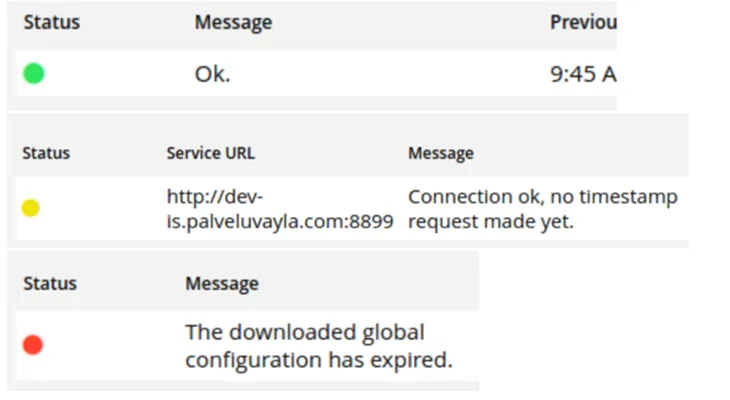
Remember to also keep an eye on your security server’s management interface. It can inform you of various errors, for example. The most common errors are presented below.
- Global configuration is expired: There was a problem retrieving the global configuration. Global configuration is retrieved from the Data Exhange Layer's central servers. Occurring issues might be related to port openings 80, 4001.
- Please enter softtoken PIN: The correct PIN has not been entered, so the keys cannot be used.
The Diagnostics page contains a list of the connections to your security server and their status. Your security server requires a connection to the timestamp server (TSA), the Data Exchange Layer's Certificate Authority (OCSP), and the central server (Global configuration).
The Status column indicates the connection status:
- Green: Connection OK.
- Yellow: To be tested.
- Red: There is a problem with the connection. In case of a problem, contact the Data Exchange Layer's administration at palveluvayla@palveluvayla.fiOpens in a new window..
The Message column contains more information about the error's type, for example.
Ensure that you have sufficient disk space
When you are considering how much space and what type of server you need, pay attention to your user numbers. As the number of users increases, so will the number of messages and your system’s workload. Therefore, it is important to track your user numbers – if they begin to exceed your previous estimates, you may run out of disk space.
Remember that when your organisation has a security server for both the test and production environment, you can use the test environment to assess the adequacy of your server capacity.
In addition, when evaluating your disk space usage, be aware that certain laws and regulations may require you to store your data for specific periods of time.
See the support articles below:
- Recommended memory settings for security servers and how to change them
- General dimensioning instructions for servers and assessing their disk space: Technical requirements for security servers
- Transferring large attachments in the Data Exchange Layer.
In the security server, disk space is mainly needed for the following:
- Text logs (var/log/xroad): one log is accumulated per day (100MB size limit), not cleaned automatically
- Database (messagelog table): by default, cleaned automatically after 30 days
- Archived message logs (/var/lib/xroad): not cleaned automatically
- SOAP message attachments: temporarily saved to the security server’s disk. The maximum size of processable attachments is set by the server’s disk space.
Please note that message logs are archived locally by default, so you need to keep track of and clean them as necessary. Your disk space will be filled up if your archived data is not stored elsewhere or deleted.
By default, the disk space required by an active message logging system is 3.6 kB + N * (21 kB + R + A) = S, where
- N = queries per minute
- R = query body in kilobytes (kB), in Finland 0 kB
- A = response body in kilobytes (kB), in Finland 0 kB
- S = disk usage per minute in kilobytes (kB/min)
Please note that the body of the query and response is 0 kB since the body, or the message content (payload), is not logged in Finland. If you want to be able to check the integrity of the actual content of the message at a later point in time, you can turn on body logging in your security server’s settings.
Remember to install any version updates
Be sure to install all necessary updates. Typically, 1–3 new versions of the security server software are released every year. Your organisation’s technical contact person will be informed of any version updates by email.
You can find the latest releases on the Version updates page.
Remember to follow these other communications channels as well:
- Future version updates are announced and their version bulletins are published in the Data Exchange Layer's Suomi.fi for Service Developers website.
- Official English-language version updates for X-Road are published by NIIS (the Nordic Institute for Interoperability solutions)Opens in a new window..
For instructions on updating your security server software, see the support articles below:
- Instructions for updating the security server software for Ubuntu security servers
- Instructions for updating the Security Server Software for RHEL Security Servers
Keep in mind that you can use your test environment to test the impact of new version updates on your services.
Before updating your security server software, do the following:
- Back up your security server.
- Make sure updating to the newest X-road version is supported from your current software version
- Update the operating system to the latest supported version, if you have not already done so.
Take care of the information security
The use of the Data Exchange Layer requires compliance with good information security practices.
See that the connection between the security server and information system is restricted and HTTPS encryption is in use. Read more about connecting the security server and information system:
Connecting an information system to a security server
In addition to version updates, take care of at least the following:
- management of acces rights and user names for your security server and information systems.
- managing information security incindents and reacting to detected infromation security vulnerabilities. Informing about these is also a part of information security practices.
- creating and managing backups.
Duplicate your security server whenever necessary
We recommend duplicating your Security Servers so that a backup server can be activated in case of failure. Duplicated Security Servers can also be used to distribute traffic across multiple servers to prevent overloading a single server.
We especially recommend duplicating the Security Server in situations where the number of clients using a shared server is high, or when the information provided by your organisation is critical and/or subject to high traffic.
By using a load balancer, you can improve the performance and reliability of your security server:
- Article on using the internal load balancer (NIIS)Opens in a new window.
- Support article on using an external load balancer in the Data Exchange Layer
Especially Intermediaries and organisations that provide Security Server services should consider the number of clients using their Security Server while considering duplication of the Security Server.