
Examples of the use cases and service paths
This article presents examples of the use cases and service paths of the Suomi.fi e-Authorizations service.
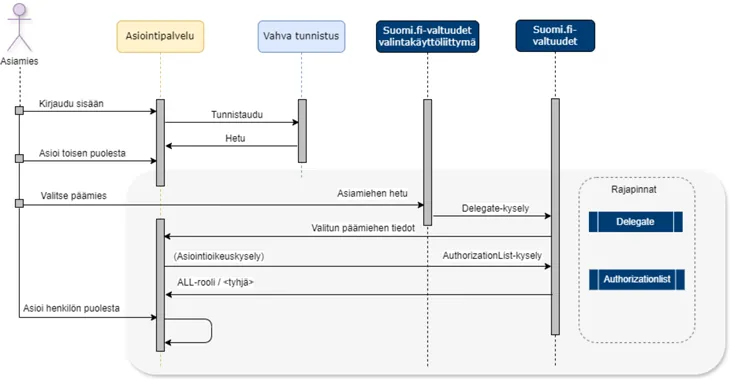
Guardian Kaisa wants to book a three-year-old’s appointment for her child, Tiina, to the health clinic services. Kaisa opens the online service. She logs in to the service using a strong means of identification, a mobile certificate [1]. At least the personal identity code and name of the identification transaction are transmitted to the service.
After successful identification, Kaisa continues to use the service and goes to the section “Act on behalf of another party”.
- Kaisa’s session will be transferred to the selection interface of Suomi.fi e-Authorizations, which will show all of Kaisa’s children.
- Kaisa chooses to act on behalf of her child Tiina.
The Suomi.fi e-Authorizations service will check the following from the Population Information System (PIS):
- register entries for Kaisa and Tiina [2]
- that Kaisa is the legal guardian of Tiina and that there are no impediments preventing her from acting on behalf of her child [3].
Kaisa’s session will return to the service. After checking from the PIS, Suomi.fi e-Authorizations transfers the ALL role to the service (using the AuthorizationList query). After this, Kaisa can book an appointment for health clinic services in the service [4].
[1] Strong identification means include online banking codes, electronic ID cards, organisation cards, healthcare and social welfare sector’s smart cards and mobile certificates.
[2] The PIS is used to check that the client (child) is alive and has not been taken into custody, for example.
[3] The following may prevent you from using the service (for more information, see When is it not possible to act on behalf of a childOpens in a new window.):
- the joint custody agreement or order also includes other matters than those related to the child’s housing arrangements.
- the child has been taken into custody.
- the dependant or both their guardians have a non-disclosure order.
- the service has imposed age restrictions on the right to act on behalf of another party.
[4] If the right to act on behalf of another party is prevented due to either information in the PIS or restrictions imposed by the service (rule engine), an empty role will be sent to the service (by using the AuthorizationList query) and you cannot continue acting on behalf of the other party.
Agent Heikki conducts a genealogical study and would like to request information from the National Archives of Finland on behalf of his cousin Liisa (client) for a report on family relationships. Heikki asks Liisa to write a power of attorney in the Suomi.fi e-Authorizations service: https://www.suomi.fi/e-authorizationsOpens in a new window.
Liisa uses an ID card for strong identification in the Suomi.fi Web Service [1] and opens the e-Authorizations service, where she selects “Grant a mandate”.
- Liisa selects Heikki as the agent, whose information the e-Authorizations service checks from the PIS based on the personal identification number.
- Liisa determines the duration of the mandate and selects the matters to which the mandate applies.
- At the end, Liisa validates the mandate.
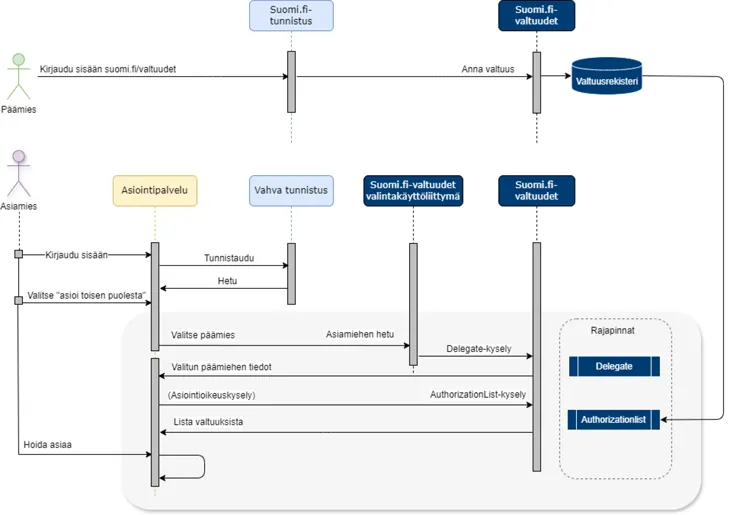
Once the mandate has been made, Heikki will see it when he has identified himself strongly in the Suomi.fi e-Authorizations service.
Agent Heikki uses online banking codes to identify himself strongly in the Astia service of the National Archives of Finland. At least the personal identity code and name of the identification transaction are transmitted to the service.
After a successful identification, Heikki selects the requests for public documents and information to be ordered. Heikki selects “Order information on behalf of another person”.
After the selection:
- The session is transferred to the selection interface of the e-Authorizations service.
- Heikki selects the person on whose behalf he wants to act (in this case, Liisa).
- The Suomi.fi e-Authorizations service checks Liisa’s information from the PIS [2] and forwards it to the service.
- The authorisation register of the Suomi.fi e-Authorizations service is used to check which mandates Liisa has granted Heikki, and the mandate themes (https://www.suomi.fi/e-authorizations/mandate-themesOpens in a new window.) are forwarded to the service.
- Heikki’s session will return to the service where he can continue his transactions.
[1] Strong identification means include online banking codes, electronic ID cards, organisation cards and mobile certificates.
[2] The PIS is used to check that the client is alive and has no impediments for the authorisation, such as a guardianship order.
Seppo is ill and wants his spouse, Riitta, to get medicine from the pharmacy on his behalf. Seppo gives Riitta an electronic power of attorney in the Suomi.fi e-Authorizations service: https://www.suomi.fi/e-authorizationsOpens in a new window..
Seppo uses an ID card for strong identification in the Suomi.fi Web Service [1] and opens the e-Authorizations service, where he selects “Grant a mandate”.
- Seppo selects Riitta as the agent, whose information the e-Authorizations service checks from the PIS based on the personal identification number.
- Seppo determines the duration of the mandate and selects the matters to which the mandate applies. In this case, he selects Use of pharmacy services as the mandate themeOpens in a new window..
- At the end, Seppo validates the mandate.
Once the mandate has been made, Riitta will see it when she has identified herself strongly in the Suomi.fi e-Authorizations service.
Now, Riitta has a mandate from Seppo to use pharmacy services, and Riitta can visit the pharmacy to get the medicines.
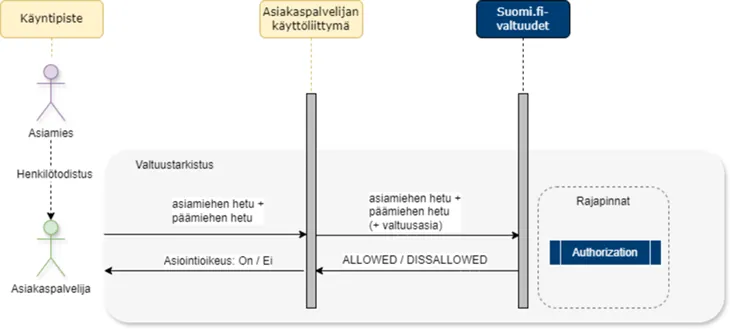
At the pharmacy:
- Riitta explains to the customer service representative that she is getting medicine on behalf of another person.
- Riitta shows the customer service representative her identity card and tells them Seppo’s personal identification number.
- The customer service representative enters Seppo’s and Riitta’s personal identity numbers in the pharmacy system.
- The system notifies the customer service representative that Riitta has the right to use pharmacy services on behalf of Seppo.
- Riitta gets Seppo’s medicines.
[1] Strong identification means include online banking codes, electronic ID cards, organisation cards and mobile certificates.
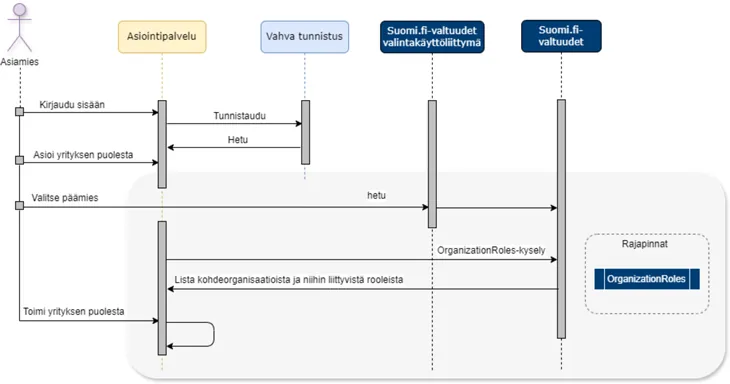
Ritva, the Managing Director of Metsä Oy, wants to make an agreement on the management of her company’s forests in the metsään.fi service. Ritva opens the online metsään.fi service. She logs in to the service using a strong means of identification, an organisation card [1]. After successful identification, Ritva continues to use the service and goes to the section “Act on behalf of a company”.
Ritva’s session will be transferred to the selection interface of Suomi.fi e-Authorizations. The e-Authorizations service checks Ritva’s rights of representation from the Trade Register/BIS on the basis of Ritva’s personal identification number. She will see a list of the companies for which she has the right to represent. Ritva chooses to act on behalf of Metsä Oy.
The Suomi.fi e-Authorizations service will check the following from the Trade Register/BIS:
- Metsä Oy’s information [2], which it forwards to the service.
- that Ritva has the signatory official role at Metsä Oy required for acting on behalf of the company [3].
Ritva’s session will return to the service.
After checking with the Trade Register/BIS, the Suomi.fi e-Authorizations service forwards a list of the agent’s organisations and the related institutional roles to the service. After this, Ritva can start using the metsään.fi service [4].
[1] Strong identification means include online banking codes, electronic ID cards, organisation cards, healthcare and social welfare sector’s smart cards and mobile certificates.
[2] The Trade Register/BIS is used to check, among other things, that the company’s status is NORMAL (possible restrictions preventing the right to use services are defined in the rule engine).
[3] Some matters may prevent you from using the service (for more information, see Acting on behalf of an organisationOpens in a new window.).
[4] If you are prevented from acting on behalf of another party due to restrictions set by either the Trade Register/BIS or the service (rule engine), you cannot continue to act on behalf of the other party.
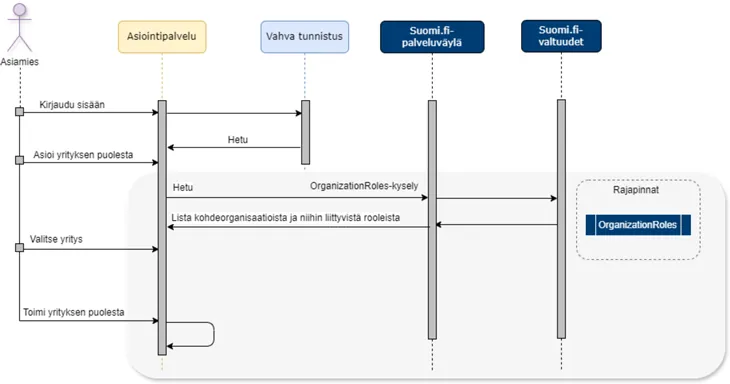
Ritva, the Managing Director of Metsä Oy, wants to make an agreement on the management of her company’s forests in the metsään.fi service. Ritva opens the online metsään.fi service. She logs in to the service using a strong means of identification, an organisation card [1].
After successful identification, Ritva continues to use the service and goes to the section “Act on behalf of a company”. (Ritva’s session will remain in the service.)
e-Authorizations
- retrieves Ritva’s right to represent the selected company from the Trade Register/BIS based on her personal identification number.
- checks the company’s status [2].
- retrieves the information to the service.
The service will show Ritva a list of the companies for which she has the right to represent [3].
After checking with the Trade Register/BIS, the Suomi.fi e-Authorizations service forwards a list of the agent’s organisations and the related representative roles to the service. After this, Ritva can start using the metsään.fi service [4].
[1] Strong identification means include online banking codes, electronic ID cards, organisation cards, healthcare and social welfare sector’s smart cards and mobile certificates.
[2] The Trade Register/BIS is used to check, among other things, that the company’s status is NORMAL (possible restrictions preventing the right to use services are defined in the rule engine.
[3] Some matters may prevent you from using the service (for more information, see Acting on behalf of an organisationOpens in a new window.).
[4] If you are prevented from acting on behalf of another party due to restrictions set by either the Trade Register/BIS or the service (rule engine), you cannot continue to act on behalf of the other party.
Erkki, the CEO of Hissi Oy, wants to authorise Financial Manager Jaakko to manage the company’s affairs. Erkki logs in to the Suomi.fi web service with strong identification using a mobile certificate [1] and moves to the e-Authorizations service.
In the e-Authorizations service, he changes the user role and selects Act on behalf of a company. After this, the e-Authorizations service shows Erkki a list of the companies in which he has the right to represent. Erkki chooses to represent Hissi Oy from the list.
- Erkki selects “Grant a mandate” and “Mandate for transactions” as the mandate type.
- Erkki defines the parties (Jaakko, with the personal identification number) and the period of validity as well as the content of the mandate.
- Erkki validates the mandate. After this, the mandate is saved in the authorisation register.
Once the mandate has been granted, Financial Manager Jaakko will see it when he has identified himself strongly in the Suomi.fi e-Authorizations service.
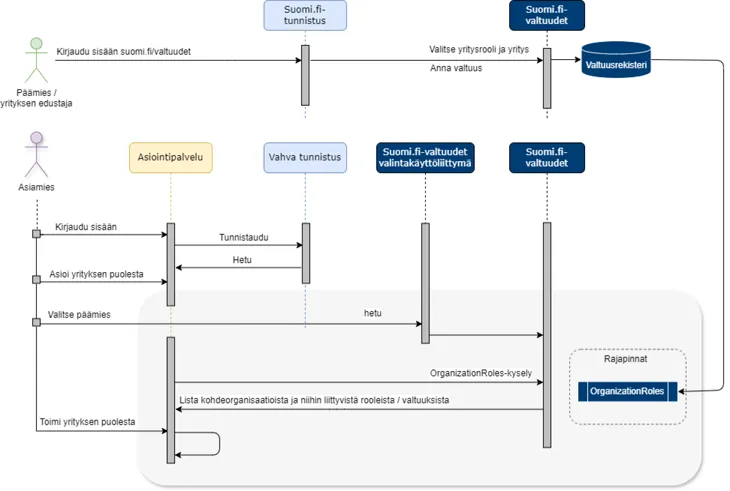
Financial Manager Jaakko (the agent) uses a mobile certificate to identify himself strongly in the Tax Administration’s services. After successful identification, Jaakko can act on behalf of the company in the matter he chooses.
After the selection:
- The session is transferred to the selection interface of the e-Authorizations service.
- Jaakko selects the company on whose behalf he wants to act (in this case, Hissi Oy).
- The Suomi.fi e-Authorizations service checks Hissi Oy’s information from the Trade Register/BIS [2] and forwards it to the service.
- The Suomi.fi e-Authorizations service’s authorisation register is used to check that Financial Manager Jaakko has a mandate granted by Hissi Oy to use the Tax Administration’s service on behalf of the company.
- Jaakko’s session will return to the service where he can continue his transactions.
After checking with the Trade Register/BIS, the Suomi.fi e-Authorizations service forwards a list of the agent’s organisations and the related representative roles and mandates to the service. After this, Jaakko can act on behalf of Hissi Oy in the Tax Administration’s service [3].
[1] Strong identification means include online banking codes, electronic ID cards, organisation cards and mobile certificates.
[2] The Trade Register/BIS is used to check that the company’s status is NORMAL, for example.
[3] If you are prevented from acting on behalf of another party due to restrictions set by either the Trade Register/BIS or the service (rule engine), you cannot continue to act on behalf of the other party.