
3. Join the test environment
After this section you have
- submitted a user permit application for the test environment
- described your organisation and services to the API Catalogue's test environment
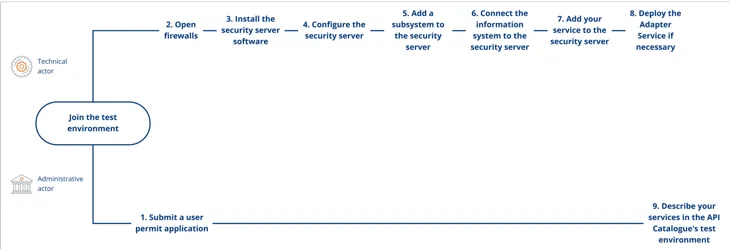
Connecting to the test environment consists of submitting a user permit application and completing a technical integration process, which your organisation may outsource to a technical solution provider of its choice. In addition, descriptions of your organisation and services are added
to the API Catalogue.
Your organisation must join the Data Exchange Layer test environment before proceeding to the production environment.
This section briefly describes steps 1 and 9 of the process for joining the test environment, which are the responsibility of the administrative contact person.
- Steps 2–8 are the responsibility of the technical contact person and are described in more detail as part of the technical joining process.
- Submit a user permit application for the test environment.
- Open firewalls according to the instructions that you previously received.
- Install the security server software. The instructions for installing the security server depend on your server’s operating system. After this, the host server will become the security server, which you can use to connect your information system to the Data Exchange Layer.
- Configure the security server. The security server can be configured programmatically or manually.
- Add a subsystem to the security server. The subsystem will function as an interface to the Data Exchange Layer for retrieving and providing information.
- Connect the information system to the security server. In this way the information is transferred from your information systems to the Data Exchange Layer and vice versa.
- If you intend to provide services to other organisations on the Data Exchange Layer, add your service to the security server. The services will be added to one of the previously added subsystems.
- Deploy the adapter service if necessary. You will need an adapter service if you provide SOAP services through the Data Exchange Layer that are not tailored to the requirements of the Data Exchange Layer.
- Describe your organisation and services in the API Catalogue's test environment.
1. Submit a user permit application for the test environment
Using the Data Exchange Layer requires a separate user permit application. Separate user permit applications must be submitted for the test environment and the production environment.
Before submitting the application, make sure that the required technical information is available.
- Detailed instructions on the required information and how to complete the application can be found in the article Filling in the user permit application for Data Exchange Layer.
Once your user permit application has been approved, your organisation's technical contact person will receive installation instructions for joining the test environment by email.
9. Describe your organisation and services in the Test API Catalogue
You will receive credentials for the Test API Catalogue once your user permit application has been approved, the technical joining process for the test environment has been completed, and your service is available in the Data Exchange Layer test environment.
Describe your organisation and service information in the Test API Catalogue in at least Finnish and Swedish. Ensure that your subsystem is displayed correctly in the Test API Catalogue and familiarise yourself with the available services. By carefully describing your services in the API Catalogue, you make it easier for others to find and use them.
See the following instructions:
- Describing your organisation in the API Catalogue
- Describing the subsystem and services in the API Catalogue
- API Catalogue instructionsOpens in a new window.
See also an example of a description for the Suomi.fi e-Authorizations serviceOpens in a new window..
Reminder about the Certificate Process
Using the Data Exchange Layer requires certificates. Detailed instructions can be found in the article Applying for Certificates for the Data Exchange Layer (from 1 May 2026).