
Describing the subsystem and services in the API Catalogue
This instruction describes how service providers should describe their subsystems and services in the API Catalogue.
The service descriptions provide the users of the API CatalogueOpens in a new window. with information about what types of services are available through the Suomi.fi Data Exchange Layer. The services are described in general in the subsystem descriptions but more specific description can be found under the services (interfaces).
You must be logged in to the API Catalogue and have permission to edit your organisation’s information in the API Catalogue.
The main user in your organisation will give you the rights to edit the information. Instructions on how to manage users in the API Catalogue are available in the support article User management in the API Catalogue. If your organisation does not have a person who has permission to edit your organisation’s information, contact API Catalogue maintenance for the permissions and necessary user IDs: palveluvayla@palveluvayla.fi.
To change the information about your subsystem, go to the subsystems information page in the API Catalogue and select Manage.
Subsystems name is automatically transferred from the Data Exchange Layer, but you can change the name in the API catalogue. We suggest that you change the name so that it is generally understandable.
The subsystem description contains a list of the services and information the subsystem provides and an explanation of how its services can be implemented. The subsystem description is a service promise that promotes its services and content information.
If the subsystem only uses other services, use the following sentence in the description: "This subsystem does not provide services; instead, it only utilises the information obtained via the Suomi.fi Data Exchange Layer."
We recommend making each subsystem service-specific. However, if the same subsystem has more than one service, you can describe each service in more detail in their individual service descriptions.
Provide the following information about your subsystem:
Subsystem’s title
Subsystem's description
- Subsystems general description: What kind of services does the subsystem offer? What are the benefits of using the services? Explain how other organisations can benefit from the service. This provides other organisations with an overview of the service and allows them to assess whether they should implement it. How to get more information about the services?
- Conditions and limitations for using the services: Which organisations are allowed to implement the services? Does the implementation of services require separate permit applications? Describe the permit process.
- Implementation of the services: How to implement services? Describe the general implementation process. How to get more information about the implementation of the services?
Keywords
- Assign keywords to your subsystem that describe the services it provides or that are essentially related to it. For example, the keywords that have been assigned to the VTJ interface subsystem include “population information system”, “personal identity code”, and “personal data”.
- In addition to name and text fields, the API Catalogue’s search function focuses on keywords. This means that when a subsystem and its services are provided with a comprehensive set of keywords, they will be easier to find in the API Catalogue. When adding keywords to a subsystem, think about the search terms that you would use to find the services in question.
- You can search for appropriate keywords in ontologies or other keyword registers within your organization's subject area. For example, the Finnish Thesaurus and Ontology Service FintoOpens in a new window. maintains the General Finnish ontology YSOOpens in a new window..
Administrator’s contact information
- Provide your subsystem administrator’s contact information so that all the interested organisations can ask about the services your subsystem contains.
- If possible, provide your organisation’s industry-specific email address instead of a personal address. This way, enquiries concerning your services will always be handled regardless of personal absences.
Visibility
- You can publish a subsystem in the API Catalogue and make it visible to everyone browsing the API Catalogue by changing its status to Public. If the status of the subsystem is set to Private, only the organisation managing the subsystem will be able to see it in the API Catalogue.
- For example, you can set the status of a subsystem to Private if the subsystem descriptions have not been finalised yet and you wish to wait until displaying the subsystem publicly in the API Catalogue.
Period of validity
- In the Valid since section, enter the date from which the service or services will be in use. If the service is to remain valid until further notice, you do not need to provide any information in the Valid until section. However, if you already know when the service is to be altered or removed from the Data Exchange Layer, enter that date in the Valid until section.
Pay attention to the following when writing the description:
- Do not write your description in an overly technical fashion – focus instead on making it as understandable as possible. Write a compact description, but remember to mention all the essential details. See for example the Digital and Population Data Services Agency’s description of its VTJ interface subsystemOpens in a new window. and the Suomi.fi e-Authorizations service descriptionOpens in a new window..
- Use formatting: Formatting helps improve the readability of your text. We recommend using subheadings to divide your description text by using the three sections presented above: Subsystems general description, Conditions and limitations for using the services and Implementation of the services.
- Add a description in Swedish and English: The language versions of the description are added to their dedicated fields. These are displayed when the API Catalogue is used in a different language. Whenever you update the description, remember to update its translations as well.
To change the description of an individual service, go to the API Catalogue page of the subsystem through which the service is imported into the Data Exchange Layer. In the Services section of this page, select the service you wish to change, and select Manage on the page that opens next.
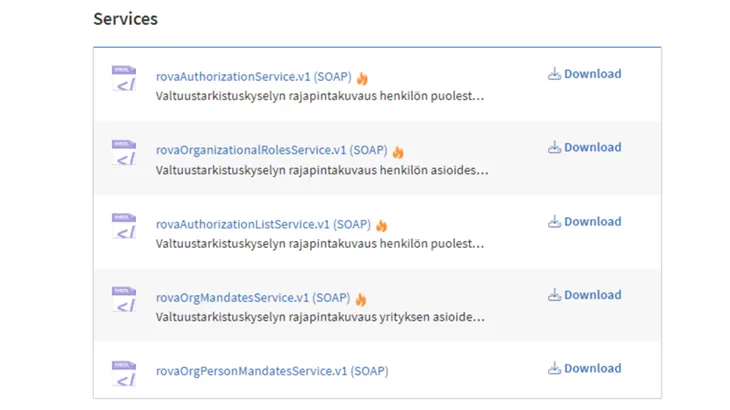
If necessary, edit the information of an individual service. You can edit the following information:
- Service description: Add a short general description to the service so that others who want to use your service (interface) can better understand how it functions.
- Service visibility
- Charges
- Validity period
- File format
The services appear in the API Catalogue when they have been added to the security server. If your service does not appear in the API Catalogue, check that it has been added to the security server according to the instructions. If your service appears in the API Catalogue as an unknown service, see the instructions in the article on the topic. If necessary, contact the maintenance of the Data Exchange Layer: palveluvayla@palveluvayla.fi.
Each service also features a technical description that is published in the API Catalogue as a WSDL or OpenAPI file that can be automatically harvested from the Data Exchange Layer. In addition, you can upload other attachments to the API Catalogue, such as PDF files, in which you can describe e.g. the terms of use of your service.
Document your REST architecture services in accordance with the OpenAPI specification. The API Catalogue displays a preview of your OpenAPI descriptions so that a person scrolling through the API Catalogue can focus on the most important details about your service. If you include links in your descriptions, make sure that they work and are not e.g. internal links. For more information about OpenAPI, see:
- OpenAPI's specification (GitHub)Opens in a new window.
- OpenAPI's basic structureOpens in a new window.
More information about the technical descriptions can be found in a separate article.
If you did not find an answer to your problem from these instructions, please contact our customer support at palveluvayla@palveluvayla.fi.