
4. Test in the test environment
After this section you have
- tested your connection to the Data Exchange Layer
- tested the thread functionality
- tested messaging using meta services
- corrected any possible errors detected during testing
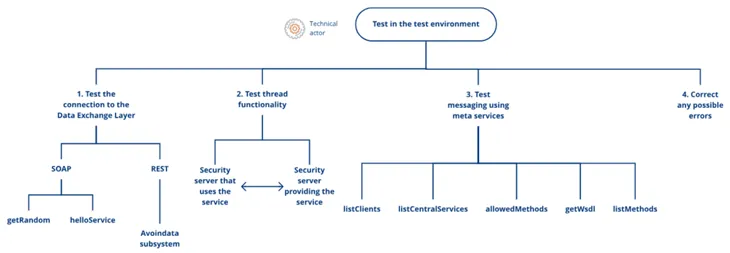
This phase provides instructions for testing the operation of the service in the test environment. This phase is intended for persons in charge of the organisation's technical joining process to the Data Exchange Layer. Testing is performed either by a technical solution provider or by your own organisation, depending on whether you have outsourced the security server solution or not. These instructions also apply in the production environment.
Test the operation of the Data Exchange Layer in the test environment before entering the production environment. Careful testing will help you ensure that you have completed all the steps in the implementation process correctly and that the Data Exchange Layer connections work smoothly. When testing is complete and you have corrected any errors that may have occurred during testing, start the proceeding to the production environment. The instructions for the proceeding to the production environment are explained in the next phase.
Test the connection of your security server to the Data Exchange Layer first, and then the functionality of messaging and communications.
- Test the connection to the Data Exchange Layer with the test services. The Data Exchange Layer provides simple getRandom and helloService services for testing the functioning of SOAP messages. The REST services can be tested using open interface services in the open data subsystem.
- Test the functionality of the message thread. You can test the thread functionality by yourself with two security servers that are connected to the test environment and also together with the service provider.
- Test messaging using meta services. You can call the meta services on the Data Exchange Layer’s central server to test the operation of messaging and of the security server.
- Finally, fix any possible errors that occurred during testing before you proceed to the production environment.
1. Test your connection to the Data Exchange Layer
The Data Exchange Layer also provides a few simple test services that allow you to test the operation of SOAP and REST messages on your security server. The same test services work in the development, test and production environments.
Testing of the SOAP services
Use the following test services to test SOAP services:
- getRandom: Returns a random integer between 0 and 100 with no call parameters. Watch the instruction video on testing the connection with getRandom (YouTube video in Finnish, subtitles available in English)Opens in a new window..
- helloService: contains the name call parameter and, in its response, it returns the greeting assigned to the name given as the parameter value.
You can use the RESTClient plugin or the Curl command-line program for testing.
See the API Catalogue for SOAP test service interface descriptionsOpens in a new window..
Testing of the REST services
Use the following rest-test test services to test REST services:
- GET rest-test/random: Returns a random integer between 0 and 100 with no call parameters.
- GET rest-test/hello: contains the name call parameter and, in its response, it returns the greeting assigned to the name given as the parameter value.
You can use the RESTClient plugin or the Curl command-line program for testing.
See the API Catalogue for REST test service interface descriptionsOpens in a new window..
2. Test thread functionality
Also test the functionality of the entire message thread to ensure that the messages pass in both directions without problems between the server that provides the service and server using the service. You can test the functionality with two ways:
1. Test the thread functionality by yourself with two security servers that are connected to the test environment
- In this case both security servers can be your own organisation's security servers
2. Test the thread functionality with the service provider
- Testing in this case depends on the service providers conditions, so agree on testing separately with the service provider
- In this case the other security server is your organisation's own security server (security server that utilises services) and the other security server is owned by the service provider (security server that provides sevices).
- The service provider can usually tell when connections work without problems.
3. Test messaging using meta services
All security servers have a few so-called meta services built into them, which you can use for example to test the functionality of the security server. Meta services can be called by anyone, as they do not require separate permits. The use of meta services is documented in the X-Road documentationOpens in a new window.. For more information about meta services and how to call them, see the Meta services support article.
The following meta services are available on security servers:
- listClients: list of the organisations that have joined the Data Exchange Layer (members) and their subsystems
- listCentralServices: list of the central services the central server provides
- allowedMethods: list of the services provided by a specific organisation that the party sending the request is authorised to access
- getWsdl: WSDL interface descriptions of the services
- listMethods: list of the services provided by a specific organisation. Standard X-Road SOAP protocol call, which is forwarded to the organisation's security server. Suitable for testing the functionality of messaging.
All security servers are connected to the central server's security server. Therefore, you can call e.g. meta services on a central security server to test whether the data connections are working. However, do not unnecessarily overload the central servers. This is therefore not suitable for continuous automatic monitoring; it must be handled separately. See instructions for monitoring in the Maintenance section.
4. Correct any possible errors detected during testing
Record the errors detected during testing and correct them before entering the production environment. When everything works without issue, you can proceed to the production environment.
Joining the production environment is carried out in the same as joining the test environment. Read more about proceeding to the production environment in the next phase.