
2. Select a security server solution
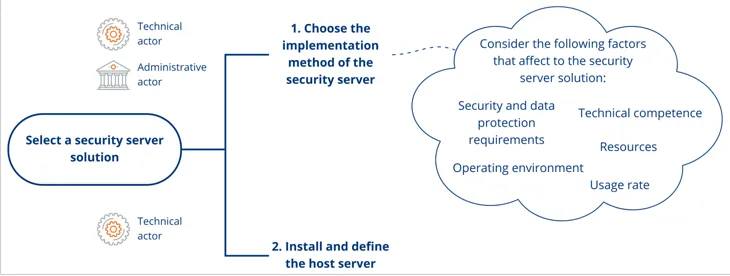
After this section you have
- chosen the implementation method of the security server together with the administrative person
- installed and configured the host server
Once you have familiarised yourself with the possibilities of the Suomi.fi Data Exchange Layer and planned and resourced its deployment, you can start joining the Data Exchange Layer. The security server connects your organisation's information system(s) to the Data Exchange Layer.
Your organisation must first decide how to implement the security server. After that your organisation has to install and configure the host server for the security server. Please note that you need separate security servers with similar technical implementation for the test environment and the production environment.
This phase describes the steps related to the security server solution.
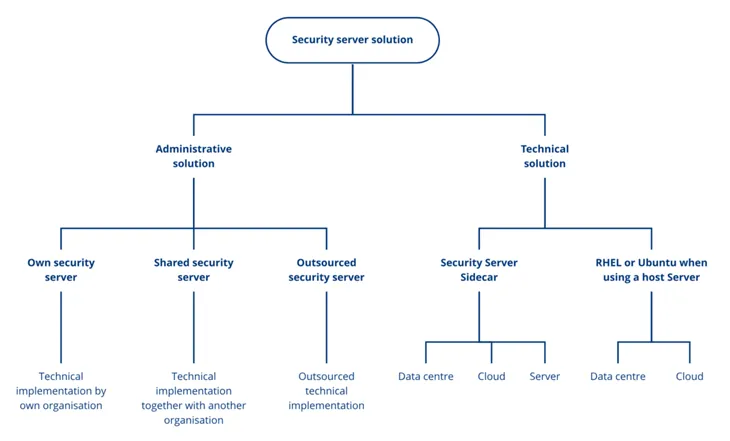
- Choose the implementation method of the security server. Implementation method of the security server can be own, shared or outsourced.
- Install and configure the host server.
1. Choose the implementation method of the security server
This phase describes options for the security server solution and the factors should consider when choosing a security server solution. Consider the options together with the administrative person.
Own, shared or outsourced security server?
Own security server
- Enough financial, technological and human resources to install and maintain an own security server
- Enough technical expertise: in security server technologies (RHEL/Ubuntu or Docker) and/or in technologies of the security servers operating environments (AWS and Kubernetes)
- Own use of the Data Exchange Layer is heavy: organisation uses several other services and/or provides own services in the Data Exchange Layer
- Read more about the implementation of a security server later on this page under "Factors that affect to the security server solution"
Shared security server
- An other organisation, that has joined Data Exchange Layer, already has a security server
- Own use of the Data Exchange Layer: is limited – own organisation uses only a few Data Exchange Layer services OR is heavy – it is possible to share the security server if other organisation’s security server has sufficient capacity
- Read the article about sharing a security server
Outsourced security server
- Own organisation has not enough technical expertise or resources
- The organisation that provides outsourcing services has existing infrastructure (data centre or cloud)
- Outsourcing is possible regardless of the usage rate of the Data Exchange Layer
- Read the article about outsoursing a security server
Factors that affect to the security server solution
Factors that affect to the security server solutions are for example resources, technical competence, operating environment, security and data protection requirements and usage rate. These factors are descirbed below in detail.
Resources
Installing and maintaining your own security server requires financial, technological and human resources. Not all organisations should install their own security server. Sharing a security server is a good choice for organisations that are in the same industry and work together a lot, for example. When a security server is shared with another organisation, the costs are also shared, which results in cost savings.
The costs of outsourcing the security server depend on your service provider. Read more about the service providers that provide outsourcing of joining the Data Exchange Layer.
Technical competence
If your organisation intends to set up its own security server, the person responsible for the security server must be familiar with the following technologies:
When using a RHEL or Ubuntu host server:
- RHEL or Ubuntu operating system
- Basics of the X-Road software
When using a containerised security server:
- Linux
- Docker
- Basics of the X-Road software
Operating environment
When making your selection, you should also take into account the future operating environment of the security server.
The Data Exchange Layer security servers can be placed in either:
- a data centre or
- a cloud environment
In addition, a containerised security server can also be set up on the same Linux server as your organisation's service.
When making your choice, consider whether your organisation has an existing data centre or cloud infrastructure or whether it needs to be purchased separately for the security server. Consider whether acquiring infrastructure is financially sensible or whether sharing or outsourcing the security server would be a better solution.
Also consider how the security server will be used. If the usage is heavy or varies significantly, a cloud service is usually the most cost-effective option.
The person responsible for the security server should know the technologies of the operating environment chosen for the security server. For example, if a containerised security server is placed in the cloud environment the person needs knowledge of
- AWS cloud environment and
- Kubernetes runtime environment.
You can also use other cloud environments, but we offer instructions and support only for the above mentioned technologies.
Security and data protection requirements
Note that your organisation must consider the operational environment of the security server from the security perspective because security and data protection requirements may impose restrictions on the security server environment. For example, if the data processed in the Data Exchange Layer must stay within the borders of and governed by laws of Finland, the security server must be located in a Finnish data centre or in a cloud environment located in Finland.
Note that your organisation must consider the security and data protections requirements even if you outsource the implementation of the security server or share the security server with another organisation.
Public administration organisations can take a look at the Ministry of Finance's Guidelines for Public Sector on Data Communications Services (in Finnish)Opens in a new window., for example.
All Data Exchange Layer security server solutions enable secure data processing for your organisation, which is why the security server can be deployed as is. However, if your organisation's data processing requirements are not met, your organisation can implement separate encryption solutions. Please remember that your organisation must ensure the information security of its own information systems and their integrations.
Usage rate
Your organisations usage rate of the Data Exchange Layer and the way it is used also affect the choice of solution.
If the use of the Data Exchange Layer is limited, i.e. your organisation uses only a few Data Exchange Layer services:
- Consider using another organisation's security server or outsourcing the implementation of the security server, since implementing your own security server may not be cost-effective.
- If your organisation wants to implement its own security server, a containerised security server either on the same server as the service or implemented in a cloud environment is often a good and cost-effective solution.
If the Data Exchange Layer is used heavily, i.e. your organisation uses several services of the Data Exchange Layer and/or provides services through the Data Exchange Layer.
- Setting up your own security server might be a good option
- It is possible to share the security server of another organisation if that security server has sufficient capacity
- It is also possible to outsource the security server
If the security server needs to process a large number of queries, consider using an external load balancer.
2. Install and configure the host server
The technical implementation method of the security server can be RHEL, Ubuntu or Docker-containerised. You can familiarise yourself with example solutions for the security servers network environment in the following articles:
- Example solutions of the security server’s network environment for the service provider
- Example solutions of the security servers network environment for the service consumer
The host server must be named correctly for the user permit application to be approved. Read more about naming the host server.
If your organisation implements an own security server, you have to install and configure its host server. Prepare the implementation of a security server solution by following the articles below:
If your organisation has Linux expertise, consider using an RHEL or Ubuntu host server for installing the security server software
- Read more about the RHEL or Ubuntu security server option
- Read more about the technical requirements for the RHEL or Ubuntu security server
- Read more about installing an RHEL security server
- Read more about installing an Ubuntu security server
If your organisation has Docker expertise, consider using a containerised security server
- Read more about the containerised security server option
- Read more about the technical requirements and implementation of the containerised security server