
Data Exchange Layer's containerised security server
A Docker containerised Security Server is one of the security server options for the Data Exchange Layer. It is a light way to join the Data Exchange Layer, but it can also be scaled to meet heavy needs. A Docker containerised security Server can be located in a cloud environment, data centre or Linux machine.
See also the other Data Exchange Layer Security Server option RHEL or Ubuntu Security Server.
What is a Docker containerised security server?
A Docker containerised security server is a Docker container packed with the X-Road security server software and everything else required to run the software. A Dcoker containerised security server can be installed on the same server as the information system itself.
The Docker containerised security server
- can be installed on any Linux platform
- does not necessarily need its own host server.
- can be used for offering and using services.
- is based on the widely used Docker technology. Read more about DockerOpens in a new window.
What kind of organisation is this security server suitable for?
A good option for an organisation that is familiar with container technology (Docker) and possibly already uses it in organisation’s other services.
What does the Security Server require from the organisation?
The necessary resources for installation and administration.
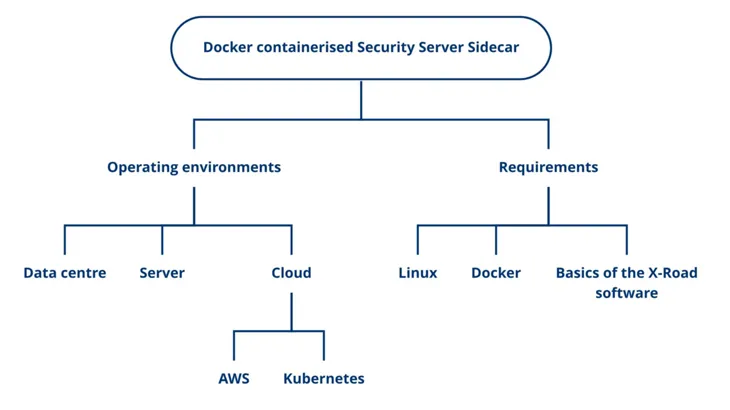
The person responsible for the Security Server should be familiar with the following technologies:
- Docker Technology
- Basics of the X-Road software
- Linux
If the Security Server is placed in the cloud, also the following:
- AWS Cloud Environment
- Kubernetes technology
Take into account the technical requirements for the platform:
- Operating System: A Linux platform with Docker software installed
- CPUs: 2 or more
- RAM: 2 GB
- Disk space: 2 GB
Learn about the technical requirements for a Docker containerised security server.
A containerised security server is suitable for both light and heavy-duty uses.
- Light usage: At its lightest, a containerised security server can be used for consuming a few services of the Data Exchange Layer.
- Heavy usage: A containerised security server can also be scaled to meet complex and heavy needs, such as providing and consuming multiple services at the same time.
We offer several different Docker images for download that serve a variety of purposes. You can find all the images listed with their intended uses in NIIS Docker HubOpens in a new window..
Security server platforms
Select the security server operating environment according to your organisation’s needs.
You can place the security server in a:
- Cloud environment: e.g. the Amazon cloud environment (AWS)
- Data centre: e.g. a data centre located in Finland
- Linux machine: e.g. Sidecar slim and the e-service on the same machine
When making your choice, consider what technologies your organisation already uses and what the usage of the Data Exchange Layer will be like.
Setting up a security server in cloud environment (AWS)
The benefits of locating a security server in a cloud environment are, for example, cost efficiency, redundancy and scalability. In a cloud environment, the capacity required by the Security Server can also be easily increased and the implementation can be made highly fault tolerant.
It is a good idea to place the security server in a cloud environment, especially when your organisation:
- already has knowledge about cloud technologies and the other services of your organisation are already in the cloud environment
- plans to use The Data Exchange heavily and the need for capacity varies. For example:
- Your organisation offers and/or uses many services.
- The degree of utilisation of your organisation's services varies. For example, data queries might peak at times.
- The services provided by your organisation must be highly fault tolerant.
A cloud environment might also be a good option when the capacity required by the organisation is low, but the organisation’s other services are already in the cloud environment or are moving to it.
We recommend that you place the security server in the Amazon cloud environment (AWS) as we support and provide guidance for the Kubernetes runtime environment on the AWS cloud platform. It is also possible to set up a Docker container in other cloud environments, but we have tested it only in the AWS environment and offer support only for AWS.
Cloud environments often use cost-effective pricing, where you pay only for the capacity you use. The costs vary depending on the cloud environment used. There are pricing calculators to help estimate costs. See, for example, the Amazon Cloud Environment (AWS) calculator.Opens in a new window.
You can read about AWS best practices hereOpens in a new window..
When selecting a cloud environment, take into account the information security and data protection requirements that affect your service. Depending on the cloud environment, data in the cloud is usually processed outside Finland. In the case of the AWS environment, for example, data might be processed in Ireland.
Setting up the security server in a data centre
A security server located in a data centre is suitable for both heavy and light use. It is more difficult to increase the capacity of a security server located in the data centre.
It is a good idea to place the security server in a data centre, when:
- Your organisation already has its own data centre infrastructure and knowledge of data centres.
- The data to be processed in the Data Exchange Layer must remain in Finland due to data protection or information security requirements.
Setting up a security server on a Linux server
If the usage of the Data Exchange Layer is light, a containerised security server can be set up on the same Linux server machine as the organisation's own e-service. We only support Linux platforms for production use.
Note that although Docker technology itself allows you to run a container on a laptop, for example, even at its lightest security server can only be installed on a server. This is due to the requirements of the Data Exchange Layer.
Differences to a security server running on an RHEL or Ubuntu host server
A containerised security server:
- Is slightly lighter compared to an RHEL or Ubuntu based security server. For example, the capacity requirements are lower.
- Does not need a dedicated host server. A single server can have many conteinerised security servers, so you need fewer host servers than when you use an RHEL or Ubuntu based security server.
- Can be installed on any Linux platform. Operating system requirements are more relaxed than in an RHEL or Ubuntu based security server.
- Based on containerisation technology. Requires less administration effort than a host server based security server. For example, software dependencies do not need to be considered during updates.
Examples of the Security Server Sidecar in different environments
Alongside a service in own IT infrastructure
A private organisation has a service in which the organisation wants to begin to use company information from the Business Information System of the Finnish Patent and Registration Office and the Finnish Tax Administration through the Data Exchange Layer. The organisation does not intend to provide services itself in the Data Exchange Layer, it only wants to use the Data Exchange Layer on a small scale. The organisation therefore decides to install the Sidecar Slim installation package to the same server on which the organisation’s own service is running. A light implementation like this serves the organisation's needs well.
In a cloud service
A public organisation provides many services in the Data Exchange Layer and also uses services provided by other organisations. The utilisation rate of the services provided by the organisation varies regularly and there are sometimes strong peaks in the use of the services. It is particularly important that the services can withstand these query peaks because their operation is critical. First, the organisation checks whether it can place its services in a cloud environment and whether there is a need to limit the data processing area, for example, to the EU/EEA. After this, the organisation decides to install the Security Server Sidecar and place it in a cloud environment, so that it can take advantage of the scaling and data security solutions provided by the cloud service. For example, the organisation may use them to configure the implementation so that it scales itself automatically to respond to the demand at a given timepoint and so that the capacity of the security server can be easily increased when necessary.
In a data centre
A public organisation is joining the Data Exchange Layer and the organisation has a data centre of its own. The organisation needs several security servers for the Data Exchange Layer and intends to place them in its own data centre to be able to take advantage of the data centre expertise in its own organisation. The organisation wants to save with the costs of the security server and makes the decision to install the Security Server Sidecar, as several of them can be installed to the same server.
Take these into account in the implementation
Take these recommendations into account when considering implementing a containerised security server.
- Use the same X-road version as the Suomi.fi Data Exchange Layer's central servers are using. You can find the version being used here.
- Use only Docker images customised for the Suomi.fi Data Exchange Layer. Make sure that the installation package has a ‘fi’ identifier. The ‘fi’ identifier means that the image has preconfigured settings that work in the Data Exchange Layer.
- When using the Data Exchange Layer to provide services, use the Sidecar -fi versions of the images. We recommend that service providers use a Sidecar image that contains all the features. Organizations that only use the services of the Data Exchange Layer can use the Sidecar slim version. The slim images do not have the features required for message logging or monitoring. Consider your organisation’s logging needs when selecting a version.
- Be sure to keep the containerised security server up-to-date. In the future, the Sidecar software will update synchronously as other X-Road updates.
- Ensure that your security and privacy requirements are met in your chosen environment. For example, the type of data processed on the security server may restrict the geographical locations in which the data may be processed. This limitation may also come from outside your organization.
- Select the same security server option for both the test and production environment. It is technically possible to use different security server options, such as a containerised security server in a test environment and a host server security server in a production environment. However, in order to facilitate maintenance and minimise faults, we recommend that test and production environments are identical. This helps also in installing updates, for example.
Also pay attention to:
- The guidelines and implementation examples are designed for the AWS environment with the Kubernetes platform.
- In the production environment, we only support the use of Linux. We have not tested the Windows or MacOS platform or support them, but they can be used for testing purposes in a development environment.
Deployment of the security server
If your organisation intends to deploy a docker containerised security server, see the following support articles
- Technical details of the containerised security server
- Security server installation documentationOpens in a new window.
- Security server in a Kubernetes environmentOpens in a new window.
- Security guideOpens in a new window. for a Docker containerised security server
If you want to know more, check out NIIS blog Opens in a new window.on containerisation of the security server.
Read also Gofore's blogOpens in a new window. on the benefits of containerised security server.