
1. Familiarise and plan
After this section you have
- familiarised yourself with the materials of the Data Exhange Layer
- familiarised yourself with the environments of the Data Exhange Layer and API Catalogue
- agreed on the technical and administrative contact persons
- agreed on roles and responsibilities in the certificate process
- considered the security server solution
- chosen the technical starting point of your services (SOAP or REST)
- familiarised yourself with the implementation of the adapter service
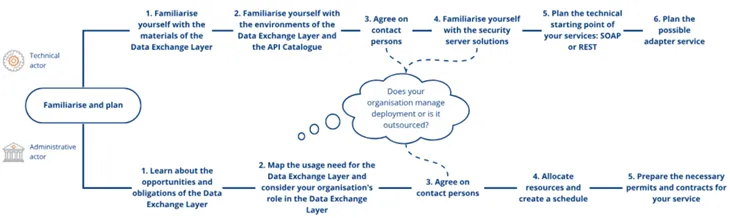
This section will get you started with deployment of the Data Exchange Layer. You can also outsource the deployment of the Data Exchange Layer. Read more about the outsourcing from another article.
Duration of the deployment
The deployment process of the Data Exchange Layer usually takes about 1–3 months but might also be shorter.
The actual installation process is not very long in itself, especially if you are already familiar with the process. If the organisation joins the Data Exchange Layer only as a service consumer, or if the organisation already has a security server that is connected to the Data Exchange Layer, the deployment process is faster.
It is a good idea to reserve a few weeks for firewall openings and granting of certificates.
Planning of the deployment
Plan your deployment carefully to make it as smooth as possible. Keep in mind that your organisation's needs and resources have an impact on the process and should be taken into account already during the planning phase. Planning of the deployment is divided into administrative and technical planning. Note, that despite this, planning must be carried out in close cooperation with all people and parties involved in the implementation process. You can find the steps that are included in the administrative planning of the deployment from another page.
On this page the following steps of the deployment's planning are described:
- Familiarise yourself with the materials of Data Exchange Layer
- Familiarise yourself with the environments of the Data Exchange Layer and the API Catalogue
- Agree on contact persons
- Agree on roles and responsibilities in the certificate process
- Familiarise yourself with the security server solutions
- Plan the technical starting point of your services: SOAP or REST
- Plan the possible adapter service
1. Familiarise yourself with the materials of Data Exchange Layer
Before joining the Data Exchange Layer, please study at least the following materials:
For more information, see:
- Frequently asked questions about the Data Exchange Layer
- Glossary of the Data Exchange Layer
- Support articles for the Data Exchange Layer
- Video instructions for joining the Data Exchange LayerOpens in a new window. (in Finnish with English subtitles). A 5-part video series on how to join the Data Exchange Layer.
- X-Road documentation in GitHubOpens in a new window.
- X-Road PlaygroundOpens in a new window.. Explore and try out the X-Road software.
- X-Road AcademyOpens in a new window.. Explore the X-Road training materials and courses.
2. Familiarise yourself with the environments of the Data Exchange Layer and the API Catalogue
Environments of the Data Exchange Layer
The Suomi.fi Data Exchange Layer works in three different environments:
- Development environment (FI-DEV): The development environment uses fictional organisations and data. You can test how the Data Exchange Layer works without the obligation to join the test or production environment. Private individuals may also join the development environment. If you want ot join the development environment of the Data Exchange Layer as an individual, you can get the necessary information for that from the Data Exchange Layer's support. The development environment uses the certificates of the operator who maintains the development environment. Those certificates can be obtained via e-mail by sending a free-form application to palveluvayla@palveluvayla.fiOpens in a new window.. You can read more about the development environment here, and this article provides instructions on how to join the development environment.
- Test environment (FI-TEST): You must always join the test environment before joining the production environment. The test environment functions in a similar manner to the production environment and allows you to test how the Data Exchange Layer works and how you can joind there. The test environment can be joined by Finnish organisations that have a business ID or organisations that are not required to register according to Finnish legislation, e.g. private companies, or that are otherwise not given a Finnish business ID, e.g. foundations. The terms of joining are described in more detail in the Data Exchange Layer's terms of use. The test environment uses actual organisations but fictional data.
- Production environment (FI): The production environment is the official operating environment of the Data Exchange Layer. You must always join the test environment before proceeding to the production environment. In the production environment, the same conditions for the joining are followed as in the test environment. The production environment contains real organisations and data.
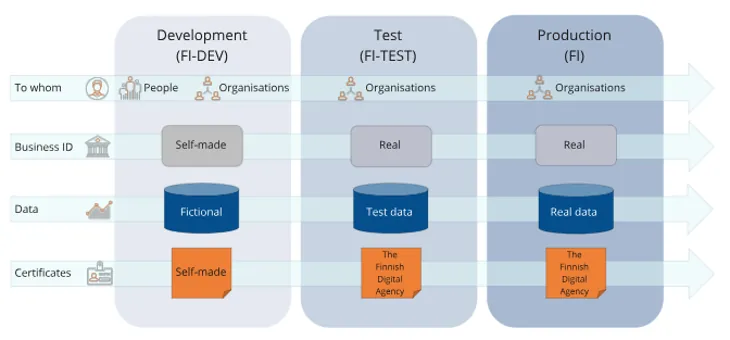
Please note that you need separate security servers for all the different environments. To learn how to install the security server software when you join a development environment, take a look at the separate support article.
Environments of the API Catalogue
The API Catalogue presents the organisations and services available in the production environment of the Data Exchange Layer. Respectively, the Test API Catalogue presents organisations and services in the test environment.
When joining the Data Exchange Layer's test environment, describe the details of your organisation and services in the Test API Catalogue. When you move to the production environment of the Data Exchange Layer, describe your organisation's details and services to the API Catalogue.
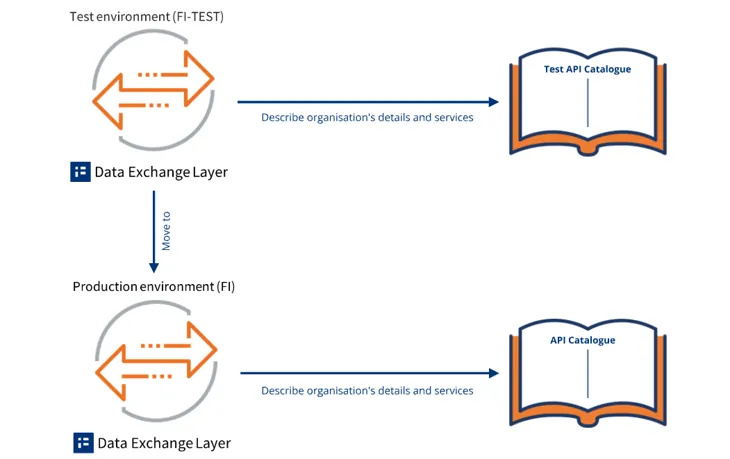
Learn more about the environments of the Data Exchange Layer and the API Catalogue.
3. Agree on contact persons
Agree on the contact persons for the deployment together with the person responsible for the technical deployment before the actual implementation of the Suomi.fi Data Exchange Layer. The administrative and technical contact person may be the same person. Appoint the following people in your organisation:
- Administrative contact person
- Deputy administrative contact person
- Technical contact person
- Deputy technical contact person
Administrative contact persons might be, for example, Project Managers, Programme Managers or IT Managers. The administrative contact person should have the right to sign for the organisation. The administrative contact person is usually responsible for the overall coordination of the deployment process, user permit applications and resourcing, for example.
Technical contact persons can be people responsible for administering your organisation’s information systems. The technical contact person is responsible for the installation, configuration and administration of the security server, among other things.
We recommend that people who are responsible for administering your organisation’s information systems participate in the technical planning. The people involved in the technical planning and the technical implementation of the deployment should have basic skills in Ubuntu or RHEL to ensure that the security server software is installed without problems. If your organisation intends to use a containerised security server, the person should be familiar with Docker technology.
The role of the appointed contact persons
Please note that you need the names and contact details of the contact persons and the deputy contact persons for the user permit application of the Data Exchange Layer.
Requests for changes to the system (e.g. adding subsystems, opening firewall ports) must be made through the contact persons indicated in the Data Exchange Layer's user permit application. The making of change requests can be transferred to a third party, and the responsible contact person must inform Data Exchange Layer's maintenance about this.
4. Agree on roles and responsibilities in the certificate process
The deployment of the Suomi.fi Data Exchange Layer requires applying for and managing certificates, which enable the deployment of the security server and the use of services.
The certificate process requires collaboration between administrative and technical responsible persons. Agree together with the administrative contact persons on who in your organisation is responsible for the different tasks in the certificate process.
Often, the same technical person who is responsible for installing certificates also submits the certificate application.
- If the security server is owned by an external service provider or an intermediary, the certificate application is typically submitted by the owner of the server.
- Agree on this together with the administrative contact persons and any intermediary, and ensure that the person in question has the necessary permissions to submit the application.
It is recommended to agree on the steps, roles, and responsibilities of the certificate process together with the administrative contact persons already during the planning phase.
When roles and responsibilities are clearly defined, the certificate process progresses smoothly as part of the deployment and ongoing maintenance. This also helps to prevent error situations.
More information about certificates and applying for them:
Applying for Certificates for the Data Exchange Layer (from 1 May 2026) - Suomi.fi Data Exchange Layer - Suomi.fi for Service Developers
5. Familiarise yourself with the security server solutions
Before you can start deploying the Data Exchange Layer, your organisation must have a server by which it connects to the Data Exchange Layer, i.e. a security server. At the planning phase, consider which solution suits your organisation best:
- Using your own security server: In this option, your organisation installs the security server software and administers the security server by itself.
- Purchasing a security server solution from an external service provider: In this option, your organisation outsources the installation of the security server software and the maintenance work related to the security server to an external service provider.
- Using another organisation's security server: In this option, you make an agreement with an organisation that has already joined the Data Exchange Layer that you will share the same security server with them instead of installing your own server.
If your organisation implements the security server by itself, the organisation must choose:
- The technical implementation method of the security server: Your organisation must choose either RHEL or Ubuntu security server or containerised security server.
- Security server’s operating environment: Your organisation must choose either a cloud environment or a data centre.
For a more detailed description of the security server solution, see the following phase.
6. Plan the technical starting point of your services: SOAP or REST
The services provided through the Data Exchange Layer may be based on either data transfers conducted in accordance with the SOAP protocol or on a REST architecture model that is independent of the data's presentation format. Before joining the Data Exchange Layer, you should consider whether your organisation will use SOAP or REST interfaces for information transfer. It is also possible to use both. The choice of the interface has some impact on the progress of the implementation process.
- SOAP (Simple Object Access Protocol) is an XML-based communication protocol. SOAP works across multiple protocols, but on the Data Exchange Layer, it is used only over HTTP. SOAP is a secure solution, but heavier solution than REST.
- REST (Representational State Transfer) is an HTTP-based architecture model for implementing APIs. REST does not limit the technologies that can be used in interfaces or the formats in which information may be presented. The most common data format used in REST applications is currently JavaScript Object Notation (JSON), but other forms of REST services can also be added to the Data Exchange Layer. REST is a more lightweight solution than SOAP, because it is more lightly standardised.
From the perspective of joining the Data Exchange Layer, the main difference between SOAP and REST services is that SOAP services primarily require a separate adapter service, while REST services do not. More information on the planning and implementation of the adapter service is provided later in this phase.
7. Plan the possible adapter service
The adapter service is a component located between the security server and the information system that adapts the services of your organisation's system to the X-Road data transfer protocol used by the Data Exchange Layer. You do not need an adapter service when:
- The SOAP service has been designed and implemented specifically for the Data Exchange Layer and in compliance with the requirements of the Data Exchange Layer.
- Your organisation uses REST interfaces for data transfer.
If your organisation uses existing SOAP interfaces to provide information through the Data Exchange Layer, an adapter service is needed. Using the Data Exchange Layer requires that the information system connected to it be able to send and receive SOAP messages in the X-Road data transfer protocol format required by the Data Exchange Layer data transfer protocol. The SOAP messages must contain certain header data specified in the data exchange protocol. In addition, the query and response parameters must be included in the SOAP message body as specified in the protocol.
The adapter service is not a prefabricated component that comes with the security server software; it must be implemented separately for each system to be connected. Therefore, the planning and implementation of the adapter service is the responsibility of your organisation. Adapter service can be implemented in:
- As a directly connected system
- As a separate adapter service between the system and the security server.
Learn more about the adapter service.