
X-Road communication protocol
This article describes the X-Road communication protocol of the Data Exchange Layer.
Joining the Data Exchange Layer requires that the system is able to send and receive SOAP and REST messages in the format required by X-Road. In practice this means that the SOAP and REST messages must contain certain header data specified by the X-Road communication protocol. In addition, the request and response parameters must also be contained in the body of the SOAP message in the manner specified by the X-Road protocol. X-Road version 7 uses SOAP version 1.1.
The article presents:
- X-Road message protocol for SOAP. Read more about X-Road message protocol for SOAPOpens in a new window.
- X-Road message protocol for REST. Read more about X-Road message protocol for RESTOpens in a new window.
1. X-Road message protocol for SOAP
HTTP header data
X-Road requires that the HTTP header data presented in Table 1 is used for messages sent through it. In messages containing attachments, Content Type header data must be multipart/related. Otherwise, value text/xml must be used. The SOAPAction header data field can be left empty or it can be set to refer to a specific URI.
HTTP header data | Value |
|---|---|
Content-Type | text/xml or multipart/related |
SOAPAction | valid URI or empty *) |
*) The security server retains and relays the SOAPAction header record to the service from X-Road version 6.16.0 onwards. Valid URI means that the URI is specified inside quotation marks (this is checked by the security server software).
Example of a correctly specified SOAPAction header:
SOAPAction: "http://x-road.eu/app#MyMessage"Example of a correctly specified empty value in SOAPAction header data:
SOAPAction: ""Interface descriptions
X-Road requires that the SOAP services connected to it are described in WSDL. XML schemes describing the structure of the requests and responses can be incorporated in the WSDL description or described in separate XML Schema Definition (XSD) files. References to these XSD files are made in the WSDL description by means of import setting.
Please note that when XSD files are used, xml:include does not work. This is because the user does not have access to the WSDL provider’s information system. However, xml:import works but the XDS file must be made accessible in the public internet, and in import, the absolute address (and not only the relative address) must be given.
Like this:
<xsd:import namespace="xyz" schemaLocation="http://palvelu-x.yritys.com/model.xsd"/>Not like this:
<xsd:import namespace="xyz" schemaLocation="model.xsd/>The schemes must make use of namespaces and unambiguous element names. The data types used in the WSDL description must be found in the network locations specified by namespaces. Otherwise, the import of WSDL on the security server will fail. This is particularly important when the namespaces in use have been made for a specific closed purpose and are not generally accessible in the public internet. In such cases, the namespace must be made available in the public internet so that it can be used.
The elementFormDefault=’qualified’ specificationOpens in a new window. is recommended for schemes. In accordance with this, all elements used in the messages based on the XML scheme in question must meet the requirements set for the namespaces specified in the scheme. In practice this means that the messages may not contain elements that are not specified in the scheme or in the namespaces used by the scheme. This prevents name conflicts and ensures that each element can be unambiguously identified.
The document/literal-binding (binding style=”document”; use=”literal”) must be used in the WSDL document. The service call binding style must be set at ‘document’, while the value of the use attribute must be set at ‘literal’.
Below is an example of a WSDL file presenting the getRandom service:
<?xml version="1.0" encoding="UTF-8" standalone="no"?>
<wsdl:definitions xmlns:soap="http://schemas.xmlsoap.org/wsdl/soap/"
                  xmlns:tns="http://test.x-road.fi/producer"
                  xmlns:wsdl="http://schemas.xmlsoap.org/wsdl/"
                  xmlns:xrd="http://x-road.eu/xsd/xroad.xsd"
                  xmlns:xsd="http://www.w3.org/2001/XMLSchema"
                  xmlns:id="http://x-road.eu/xsd/identifiers"
                  name="testService" targetNamespace="http://test.x-road.fi/producer">
    <wsdl:types>
        <xsd:schema elementFormDefault="qualified" targetNamespace="http://test.x-road.fi/producer">
            <!-- Import X-Road schema -->
            <xsd:import id="xrd" namespace="http://x-road.eu/xsd/xroad.xsd" schemaLocation="http://x-
road.eu/xsd/xroad.xsd"/>
            <xsd:element name="getRandom" nillable="true">
                <xsd:complexType />
            </xsd:element>
            <xsd:element name="getRandomResponse">
                <xsd:complexType>
                    <xsd:sequence>
                        <xsd:element name="data" type="xsd:string">
                            <xsd:annotation>
                                <xsd:documentation>
                                    Service response
                                </xsd:documentation>
                            </xsd:annotation>
                        </xsd:element>
                    </xsd:sequence>
                </xsd:complexType>
            </xsd:element>
        </xsd:schema>
    </wsdl:types>
    <wsdl:message name="requestheader">
        <wsdl:part name="client" element="xrd:client" />
        <wsdl:part name="service" element="xrd:service" />
        <wsdl:part name="userId" element="xrd:userId" />
        <wsdl:part name="id" element="xrd:id" />
        <wsdl:part name="issue" element="xrd:issue"/>
        <wsdl:part name="protocolVersion" element="xrd:protocolVersion" />
    </wsdl:message>
    <wsdl:message name="getRandom">
        <wsdl:part name="body" element="tns:getRandom"/>
    </wsdl:message>
    <wsdl:message name="getRandomResponse">
        <wsdl:part name="body" element="tns:getRandomResponse"/>
    </wsdl:message>
    <wsdl:portType name="testServicePortType">
        <wsdl:operation name="getRandom">
            <wsdl:input message="tns:getRandom"/>
            <wsdl:output message="tns:getRandomResponse"/>
        </wsdl:operation>
    </wsdl:portType>
    <wsdl:binding name="testServiceBinding" type="tns:testServicePortType">
        <soap:binding style="document" transport="http://schemas.xmlsoap.org/soap/http" />
        <wsdl:operation name="getRandom">
            <soap:operation soapAction="" style="document" />
            <xrd:version>v1</xrd:version>
            <wsdl:input>
                <soap:body parts="body" use="literal"/>
                <soap:header message="tns:requestheader" part="client" use="literal"/>
                <soap:header message="tns:requestheader" part="service" use="literal"/>
                <soap:header message="tns:requestheader" part="userId" use="literal"/>
                <soap:header message="tns:requestheader" part="id" use="literal"/>
                <soap:header message="tns:requestheader" part="issue" use="literal"/>
                <soap:header message="tns:requestheader" part="protocolVersion" use="literal"/>
            </wsdl:input>
            <wsdl:output>
                <soap:body parts="body" use="literal"/>
                <soap:header message="tns:requestheader" part="client" use="literal"/>
                <soap:header message="tns:requestheader" part="service" use="literal"/>
                <soap:header message="tns:requestheader" part="userId" use="literal"/>
                <soap:header message="tns:requestheader" part="id" use="literal"/>
                <soap:header message="tns:requestheader" part="issue" use="literal"/>
                <soap:header message="tns:requestheader" part="protocolVersion" use="literal"/>
            </wsdl:output>
        </wsdl:operation>
    </wsdl:binding>
    <wsdl:service name="testService">
        <wsdl:port binding="tns:testServiceBinding" name="testServicePort">
            <soap:address location="http://example.com/Endpoint"/>
        </wsdl:port>
    </wsdl:service>
</wsdl:definitions>
The required namespaces are presented at the start of the WSDL. Please note! Always use the absolute address.
<wsdl:definitions xmlns:soap="http://schemas.xmlsoap.org/wsdl/soap/"
                  xmlns:tns="http://test.x-road.fi/producer"
                  xmlns:wsdl="http://schemas.xmlsoap.org/wsdl/"
                  xmlns:xrd="http://x-road.eu/xsd/xroad.xsd"
                  xmlns:xsd="http://www.w3.org/2001/XMLSchema"
                  xmlns:id="http://x-road.eu/xsd/identifiers"
                  name="testService" targetNamespace="http://test.x-road.fi/producer">
Data types of the operations to be provided:
<wsdl:types>
    <xsd:schema elementFormDefault="qualified" targetNamespace="http://test.x-road.fi/producer">
        <!-- Import X-Road schema -->
        <xsd:import id="xrd" namespace="http://x-road.eu/xsd/xroad.xsd" schemaLocation="http://x-
road.eu/xsd/xroad.xsd"/>
       <xsd:element name="getRandom" nillable="true">
       <xsd:complexType />
            </xsd:element>
            <xsd:element name="getRandomResponse">
                <xsd:complexType>
                    <xsd:sequence>
                        <xsd:element name="data" type="xsd:string">
                            <xsd:annotation>
                                <xsd:documentation>
                                    Service response
                                </xsd:documentation>
                            </xsd:annotation>
                        </xsd:element>
                    </xsd:sequence>
                </xsd:complexType>
        </xsd:element>
    </xsd:schema>
</wsdl:types>
X-Road parameters for the request header:
<wsdl:message name="requestheader">
    <wsdl:part name="client" element="xrd:client" />
    <wsdl:part name="service" element="xrd:service" />
    <wsdl:part name="userId" element="xrd:userId" />
    <wsdl:part name="id" element="xrd:id" />
    <wsdl:part name="issue" element="xrd:issue"/>
    <wsdl:part name="protocolVersion" element="xrd:protocolVersion" />
</wsdl:message>
Content of the service to be provided. The structure must always be as follows:
<wsdl:message name="getRandom">
    <wsdl:part name="body" element="tns:getRandom"/>
</wsdl:message>
<wsdl:message name="getRandomResponse">
    <wsdl:part name="body" element="tns:getRandomResponse"/>
</wsdl:message>
Operation to be provided:
<wsdl:portType name="testServicePortType">
    <wsdl:operation name="getRandom">
        <wsdl:input message="tns:getRandom"/>
        <wsdl:output message="tns:getRandomResponse"/>
    </wsdl:operation>
</wsdl:portType>
Presentation of the operation to be provided. The input body contains the request for the operation, and headers direct the request to the right service. The output body contains the response given by the operation and the service that received the request.
<wsdl:binding name="testServiceBinding" type="tns:testServicePortType">
    <soap:binding style="document" transport="http://schemas.xmlsoap.org/soap/http" />
    <wsdl:operation name="getRandom">
        <soap:operation soapAction="" style="document" />
        <xrd:version>v1</xrd:version>
        <wsdl:input>
            <soap:body parts="body" use="literal"/>
            <soap:header message="tns:requestheader" part="client" use="literal"/>
            <soap:header message="tns:requestheader" part="service" use="literal"/>
            <soap:header message="tns:requestheader" part="userId" use="literal"/>
            <soap:header message="tns:requestheader" part="id" use="literal"/>
            <soap:header message="tns:requestheader" part="issue" use="literal"/>
            <soap:header message="tns:requestheader" part="protocolVersion" use="literal"/>
        </wsdl:input>
        <wsdl:output>
            <soap:body parts="body" use="literal"/>
            <soap:header message="tns:requestheader" part="client" use="literal"/>
            <soap:header message="tns:requestheader" part="service" use="literal"/>
            <soap:header message="tns:requestheader" part="userId" use="literal"/>
            <soap:header message="tns:requestheader" part="id" use="literal"/>
            <soap:header message="tns:requestheader" part="issue" use="literal"/>
            <soap:header message="tns:requestheader" part="protocolVersion" use="literal"/>
        </wsdl:output>
    </wsdl:operation>
</wsdl:binding>
The full name of the service providing the above-mentioned operations:
<wsdl:service name="testService">
    <wsdl:port binding="tns:testServiceBinding" name="testServicePort">
        <soap:address location="http://example.com/Endpoint"/>
    </wsdl:port>
</wsdl:service>
SOAP header data
The SOAP header data required by X-Road is presented in Table 2.
Field | Mandatory | Further information |
|---|---|---|
service | x | See table 3. |
service | x | See table 3. |
userId | User name of the end user generating the call in the information system. If the call is automatically generated by the information system, the name of the information system can also be used. | |
id | x | The unique identifier specifying the request and response message. The sender of the call is responsible for generating the identifier. |
issue | This field can be used to relay other free-form information related to the call. | |
requestHash | Only in SOAP responses. Added by the producer’s security server. | |
requestHash@algorithmId | Only in SOAP responses. Added by the producer’s security server. | |
protocolVersion | x | Version number of the X-Road communication protocol used in the message. In X-Road version ≥ 6.4, the communication protocol has version number 4.0. |
Table 2. SOAP header data.
The response must contain exactly the same header data as the request.
A client element is used to indicate the consumer and service element to indicate the producer. Both elements consist of a large number of subelements, the contents of which constitute the identifiers specifying the consumer and the producer.
- organisation-specific identifiers: sdsbInstance, memberClass, memberCode
- system-specific identifiers: xRoadInstance, memberClass, memberCode, subsystemCode
- service-specific identifiers: xRoadInstance, memberClass, memberCode, subsystemCode, getRandom, serviceVersion.
In the example message below, the identifier of the consumer is FI.GOV.12345-6.ConsumerService and the identifier of the producer FI.GOV.65432-1.DemoService.getRandom.v1.
Header data in version 6:
<SOAP-ENV:Envelope
  xmlns:SOAP-ENV=http://schemas.xmlsoap.org/soap/envelope/
  xmlns:id="http://x-road.eu/xsd/identifiers"
  xmlns:xrd="http://x-road.eu/xsd/xroad.xsd">
  <soapenv:Header>
    <xrd:client id:objectType="SUBSYSTEM">
      <id:xRoadInstance>FI</id:xRoadInstance>
      <id:memberClass>GOV</id:memberClass>
      <id:memberCode>12345-6</id:memberCode>
      <id:subsystemCode>ConsumerService</id:subsystemCode>
    </xrd:client>
    <xrd:service id:objectType="SERVICE">
      <id:xRoadInstance>FI</id:xRoadInstance>
      <id:memberClass>GOV</id:memberClass>
      <id:memberCode>65432-1</id:memberCode>
      <id:subsystemCode>DemoService</id:subsystemCode>
      <id:serviceCode>getRandom</id:serviceCode>
      <id:serviceVersion>v1</id:serviceVersion>
    </xrd:service>
    <xrd:userId>mvirtanen</xrd:userId>
    <xrd:id>1234567890</xrd:id>
    <xrd:protocolVersion>4.0</xrd:protocolVersion>
  </soapenv:Header>
  <soapenv:Body>
    .
    .
    .
  </soapenv:Body>
</soapenv:Envelope>
Table 3 contains brief descriptions of the contents of the subelements of client and service elements.
Element | Description |
|---|---|
xRoadInstance | Unique identifier of the X-Road instance. The identifier consists of the ISO standard country code and an attachment specifying the technical environment. Development environment: FI-DEV, test environment: FI-TEST, and production environment: FI. |
memberClass | The unique identifier specifying the organisation type within a specific instance, for example: central government organisation (GOV), municipality (MUN), private enterprise (COM), or foundation (ORG). |
memberCode | An identifier specifying an organisation. In Data Exchange Layer it is the organisation’s Business ID. The identifier must be unique at least within the type of organisation selected. |
subsystemCode | Identifier specifying an information system or logical service/system to be connected with the Data Exchange Layer. |
serviceCode | Name/identifier of a SOAP service accessible in the Data Exchange Layer. |
serviceVersion | SOAP service version, for example v1 or v2. |
Table 3. Client and service elements.
Read more about the identifiers used in X-Road.
SOAP Body
The request and response parameters used by the information system which is joined to the Data Exchange Layer must be contained in the body of the SOAP message in the manner specified by the X-Road protocol. Since the X-Road version 6, request/response envelopes are not mandatory anymore.
Organisations joining the Data Exchange Layer are free to decide on the use of the request/response envelopes when connecting their own services to the Data Exchange Layer. However, envelopes must be used in a uniform manner in each service. This means that envelopes must be used in both requests and responses or in neither of them.
Request
The requests sent via X-Road must be as follows when request/response envelopes are not used:
<SOAP-ENV:Envelope  xmlns:SOAP-ENV=http://schemas.xmlsoap.org/soap/envelope/
  xmlns:id="http://x-road.eu/xsd/identifiers"
  xmlns:xrd="http://x-road.eu/xsd/xroad.xsd">
  <soapenv:Header>
    Header content
  </soapenv:Header>
  <soapenv:Body>
    <m:service xmlns:m="URI">
        Request content
    </m:service>
  </soapenv:Body>
</soapenv:Envelope>
When request/response envelopes are used, the request must be as follows:
<SOAP-ENV:Envelope
  xmlns:SOAP-ENV=http://schemas.xmlsoap.org/soap/envelope/
  xmlns:id="http://x-road.eu/xsd/identifiers"
  xmlns:xrd="http://x-road.eu/xsd/xroad.xsd">
  <soapenv:Header>
    Header content
  </soapenv:Header>
  <soapenv:Body>
    <m:service xmlns:m="URI">
      <m:request>
        Request content
      </m:request>
    </m:service>
  </soapenv:Body>
</soapenv:Envelope>
Request payload
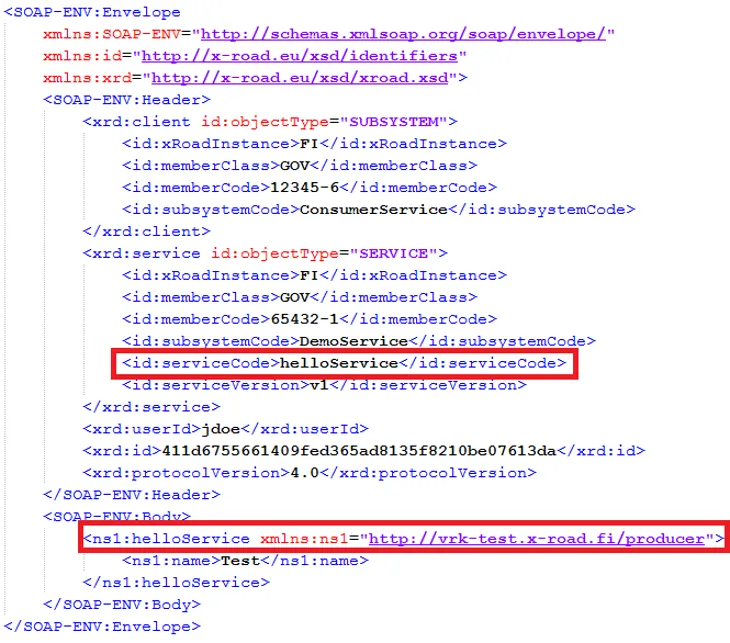
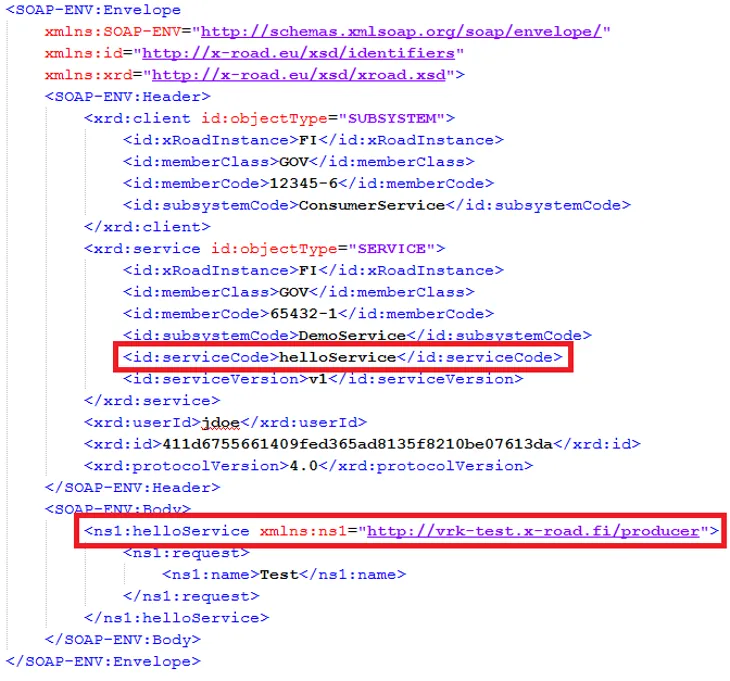
Request payload must be located in the body of the SOAP message. The XML element containing the payload must be named in accordance with the service. The name of the service is specified in the serviceCode element under the service element of the SOAP message header.
In the following example, the call for the helloService is without the request envelope. For reasons of clarity, all additional elements have been omitted.
<SOAP-ENV:Envelope>
  <soapenv:Header>
    <sdsb:service id:objectType="SERVICE">
      <id:serviceCode>helloService</id:serviceCode>
    </sdsb:service>
  </soapenv:Header>
  <soapenv:Body>
    <m:helloService xmlns:m="URI">
        Request content
    </m:helloService>
  </soapenv:Body>
</soapenv:Envelope>
See also unsimplified requests:
Response
Responses sent via X-Road must always contain the same header data as the request.
The responses sent via X-Road must be as follows when request/response envelopes are not used:
<SOAP-ENV:Envelope
  xmlns:SOAP-ENV=http://schemas.xmlsoap.org/soap/envelope/
  xmlns:id="http://x-road.eu/xsd/identifiers"
  xmlns:xrd="http://x-road.eu/xsd/xroad.xsd">
  <soapenv:Header>
    Header content
  </soapenv:Header>
  <soapenv:Body>
    <m:serviceResponse xmlns:m="URI">
        Response content
    </m:service>
  </soapenv:Body>
</soapenv:Envelope>
When request/response envelopes are used, the response must be as follows:
<SOAP-ENV:Envelope
  xmlns:SOAP-ENV=http://schemas.xmlsoap.org/soap/envelope/
  xmlns:id="http://x-road.eu/xsd/identifiers"
  xmlns:xrd="http://x-road.eu/xsd/xroad.xsd">
  <soapenv:Header>
    Header content
  </soapenv:Header>
  <soapenv:Body>
    <m:serviceResponse xmlns:m="URI">
      <m:request>
        Request content
      </m:request>
      <m:response>
        Response content
      </m:response>
    </m:service>
  </soapenv:Body>
</soapenv:Envelope>
See also unsimplified responses:
Unsimplified response without request-response envelopes (XML, 1.28 kB)Opens in a new window.
Unsimplified response with request-response envelopes (XML, 1.43 kB)Opens in a new window.
Response payload
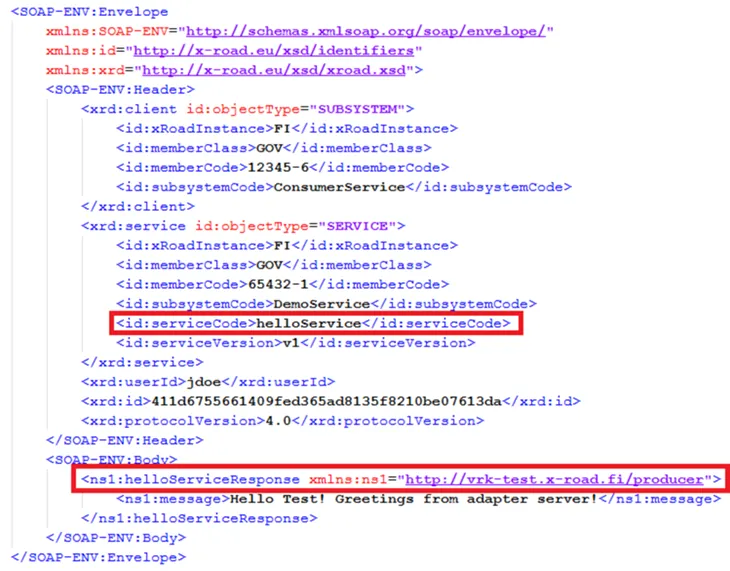
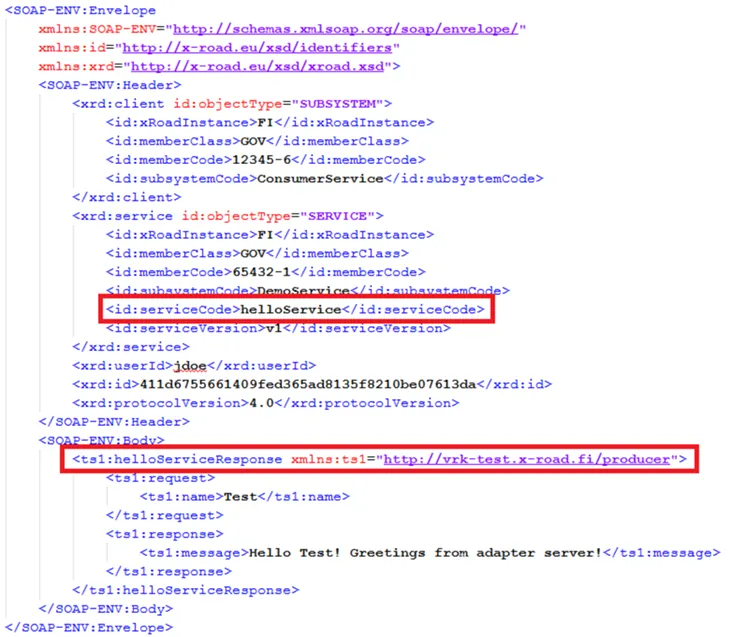
The response payload must be located in the body of the SOAP message. The XML element containing the payload must be named so that the name consists of the service name and the Response attachment added to the end of the name. The name of the service is specified in the serviceCode element under the service element of the SOAP message header.
Below are the responses returned by helloService. For reasons of clarity, all additional elements have been omitted.
Example of a response without request/response envelopes:
<SOAP-ENV:Envelope>
  <soapenv:Header>
    <sdsb:service id:objectType="SERVICE">
      <id:serviceCode>helloService</id:serviceCode>
    </sdsb:service>
  </soapenv:Header>
  <soapenv:Body>
    <m:helloServiceResponse xmlns:m="URI">
        Response content
    </m:helloServiceResponse>
  </soapenv:Body>
</soapenv:Envelope>
Example of a response with request/response envelopes:
<SOAP-ENV:Envelope>
  <soapenv:Header>
    <sdsb:service id:objectType="SERVICE">
      <id:serviceCode>helloService</id:serviceCode>
    </sdsb:service>
  </soapenv:Header>
  <soapenv:Body>
    <m:helloServiceResponse xmlns:m="URI">
      <m:request>
        Request content
      </m:request>
      <m:response>
        Response content
      </m:response>
    </m:helloServiceResponse>
  </soapenv:Body>
</soapenv:Envelope>
See also unsimplified responses:
Error messages
X-Road allows the return of two types of error messages: standard SOAP error and non-technical SOAP error.
Standard SOAP error
It is not mandatory to include SOAP header data in the standard SOAP error. However, it is recommended. The fault codes must be in accordance with SOAP specifications:Opens in a new window.
VersionMismatch
- Invalid namespace has been used in the SOAP message. Therefore, the SOAP processor generates a fault code indicating version incompatibility. Make sure the the namespace is specified correctly.
MustUnderstand
- The child element of the SOAP header element contains the MustUnderstand attribute with value TRUE or 1, but the message recipient’s SOAP processor cannot identify or process the element.
Client
- The client fault code refers to the incorrect content of the call message. In that case, the call message generated by the client end is incorrect.
Server
- The server fault code refers to error situations other than those caused by the contents of the call message. In that case, an error has occurred in the processing of the call on the service side.
<SOAP-ENV:Envelope xmlns:SOAP-ENV="http://schemas.xmlsoap.org/soap/envelope/">
    <SOAP-ENV:Header>
        Header content
    </SOAP-ENV:Header>
    <SOAP-ENV:Body>
        <SOAP-ENV:Fault>
            <faultcode>fault code</faultcode>
            <faultstring>fault string</faultstring>
            <faultactor>fault actor</faultactor>
            <detail>fault details</detail>
        </SOAP-ENV:Fault>
    </SOAP-ENV:Body>
</SOAP-ENV:Envelope>
Non-technical SOAP error
Non-technical SOAP error is an application-specific error message. It should contain an application-specific fault code and a fault string. The message should contain SOAP header data.
<SOAP-ENV:Envelope xmlns:SOAP-ENV="http://schemas.xmlsoap.org/soap/envelope/">
    <SOAP-ENV:Header>
        Header content
    </SOAP-ENV:Header>
    <SOAP-ENV:Body>
        <m:serviceResponse xmlns:m="URI">
            <faultCode>fault code</faultCode>
            <faultString>fault string</faultString>
        </m:serviceResponse>
    </SOAP-ENV:Body>
</SOAP-ENV:Envelope>
A non-technical SOAP error can use request/response envelopes as in a normal response. If envelopes are used in requests and responses, they should also be used in non-technical SOAP errors.
<SOAP-ENV:Envelope xmlns:SOAP-ENV="http://schemas.xmlsoap.org/soap/envelope/">
    <SOAP-ENV:Header>
        Header content
    </SOAP-ENV:Header>
    <SOAP-ENV:Body>
        <m:serviceResponse xmlns:m="URI">
            <m:request>
                Request content
            </m:request>
            <m:response>
                <faultCode>fault code</faultCode>
                <faultString>fault string</faultString>
            </m:response>
        </m:serviceResponse>
    </SOAP-ENV:Body>
</SOAP-ENV:Envelope>
Service example
Example without request/response envelopes
A simple helloService is used as an example. A user’s name is given as the request parameter and the greeting to that particular user is returned in the response. See service examples:
Example of a response with request/response envelopes
A simple helloService is used as an example. A user’s name is given as the request parameter and the greeting to that particular user is returned in the response. See service examples:
2. X-Road message protocol for REST
REST works alongside SOAP messages. Read more about the details of the REST X-Road communication protocolOpens in a new window. such as optional header data.
HTTP header data
In REST, the party making the request only has one mandatory piece of header data (X-Road-Client). Other header data is optional. The X-Road-Client specifies the organisation/subsystem that requests the service. The subsystem code is optional.
X-Road-Client: INSTANCE/CLASS/MEMBER/SUBSYSTEMThe X-Road security server always overwrites the following header data:
- Connection
- Host
- Keep-Alive
- Proxy-Authenticate
- Proxy-Authorization
- Server
- TE
- Trailer
- Transfer-Encoding
- Upgrade
- User-Agent.
Request
X-Road uses HTTP version 1.1. The organisation/subsystem is specified using HTTP header data. The requested system is encoded as part of the HTTP(S) request URL.
The request format is as follows:
{http-request-method} /{protocol-version}/{serviceId}[/path][?query-parameters]Explanations for request format components:
- http-request-method: may be a standard request method (such as GET, POST, PUT or DELETE)
- protocol-version: REST X-Road communication protocol version, which must be r1 until the version is updated
- serviceId: subsystem identification ID, which contains the following information (SUBSYSTEM is optional): /INSTANCE/CLASS2/MEMBER2/SUBSYSTEM2/BARSERVICE
- path: contains the relative path of the requested service
- query-parameters: contain the query parameters sent to the service.
An example of a REST request:
GET /r1/INSTANCE/CLASS2/MEMBER2/SUBSYSTEM2/BARSERVICE/v1/bar/zyggy?quu=1Assuming that serviceId refers to https://barservice.example.org/, the service provider sees the request
GET https://barservice.example.org/v1/bar/zyggy?quu=1Recommended header data
Even though there is only one mandatory piece of header data (X-Road-Client) in REST, it is recommended that Content-Type and Accept header data are also used.
The Content-Type header data is as follows:
Content-Type: application/json; charset=utf-8
Content-Type: multipart/form-data; boundary=something
Even if Content-Type header data is not used, the request is still relayed to the service. In that case, the service decides what to do with the message.
The Accept header data is as follows:
Accept: application/xmlIf the Accept header data is not used, the security server uses application/json as standard.
Response
In the response, X-Road-specific header data set by the security server is returned. The service should not set these, as otherwise the security server will only overwrite them. The header data to be returned in the response is as follows:
- X-Road-Client: specifies the member/subsystem used as service client.
- X-Road-Service: specifies the serviceId requested by the service client
- X-Road-Id: unique message identifier
- X-Road-Request-Hash: for responses; contains SHA-512-encoded request summary
- X-Road-Error: notifies of the X-Road error in the processing of request (in the consumer/producer security server)
- X-Road-Id: unique request identifier
An example of a REST response:
X-Road-Client: INSTANCE/CLASS/MEMBER/SUBSYSTEM
X-Road-Service: INSTANCE/CLASS/MEMBER/SUBSYSTEM/PETSTORE
X-Road-Id: fa2e18a5-c2cb-4d09-b994-f57727f7c3fb
X-Road-Request-Hash: 4c519cf0-0e5e-4ccf-b72b-8ed6fe289e6e
X-Road-Request-Id: f92591a3-6bf0-49b1-987b-0dd78c034cc3
Error messages
The security server uses HTTP status codes to indicate an error. In practice, there are four types of error:
- On security servers, everything worked, but the service provider’s system returned the error.
- The service provider’s system encountered a problem and did not return the response.
- The service user’s system sent a request that does not follow the REST X-Road communication protocol.
- The security server encountered a problem.
The following fault codes are used to indicate the above fault types:
- The system generates the status code, response unit and HTTP header data and returns them to the user unchanged.
- 500: the security server returns the status code, response unit and HTTP header data.
- 400 – Invalid request: the security server returns the status code, response unit and HTTP header data.
- 500 – Internal server error: the security server returns the status code, response unit and HTTP header data.
In addition to the status codes, the security server also adds the HTTP header data X-Road-Error if the error occurs on the security server. The header only contains the fault type. All detailed information can be found in other message data. The X-Road-Error header data can be as follows:
Server.ServerProxy.DatabaseError
Information security
Secure REST services should only offer HTTPS endpoints. HTTPS protects authentication information in the transfer (such as passwords, API keys and JSON Web Tokens). X-Road does not support JWT as authentication method between the security server and service. JWTs can be used by sending them in HTTP header data from the service user to the service producer; X-Road transfers the header data unchanged.
Service description
The REST services to be connected to the security server must be described in accordance with the OpenAPI 3 specification.
- OpenAPI 3 specificationOpens in a new window.
- Example of a description of REST services connected to the security serverOpens in a new window.
If you add services using REST API Base Path, they are not shown correctly in API CatalogueOpens in a new window. as they are missing the technical interface description. Thus, we recommend adding REST services using OpenAPI 3 Description.
Service example
The Digital and Population Data Services Agency offers open data interface services for testing REST messaging. See the API Catalogue for descriptions of open data services and examples of their useOpens in a new window..