Your organisation sends and receives messages through the Suomi.fi Messages API. The Digital and Population Data Services Agency does not provide a user interface for organisations.
Your organisation can either build the integration itself or make use of ready-made solutions provided by system suppliers. In many cases, Suomi.fi Messages can be integrated into an existing system, allowing your professionals to continue working in a familiar user interface.
The available functionalities and message-handling methods may vary between systems and solutions. Always confirm with your system supplier which features the integration supports and how they are implemented.
Where is information created and processed?
Before selecting a technical solution, your organisation should understand its information management, system landscape and the stages involved in handling a matter:
Where is the information created?
Where are decisions made or documents generated?
At which stages should or would you like messages to be sent to the end user?
Suomi.fi Messages is always connected to a system. In most cases, the integration is implemented in the system where:
a decision, notification or other document is generated or
sending a message is part of the normal workflow, for example a stage related to handling a matter.
Below are the most common ways in which Suomi.fi Messages is connected to a system. An organisation may use several different solutions simultaneously.
Starting the deployment
You can begin the deployment once you have identified the systems to which Suomi.fi Messages should be connected.
If you are building the integration yourself, proceed according to the instructions for administrative and technical deployment.
If you are implementing the integration using a ready-made solution provided by a system supplier, agree on the start of the deployment with your system supplier and proceed according to the instructions for administrative deployment.
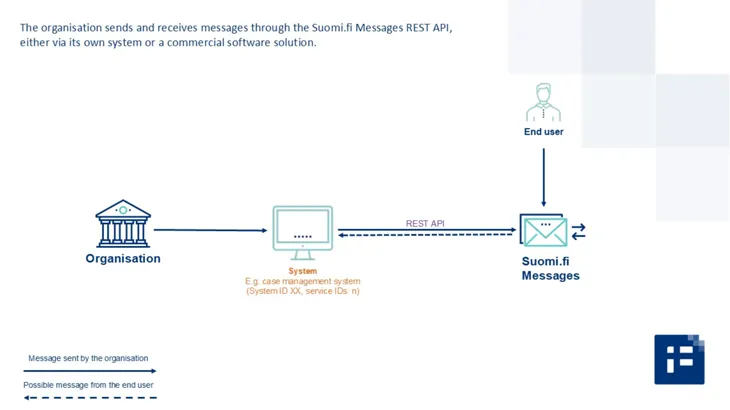
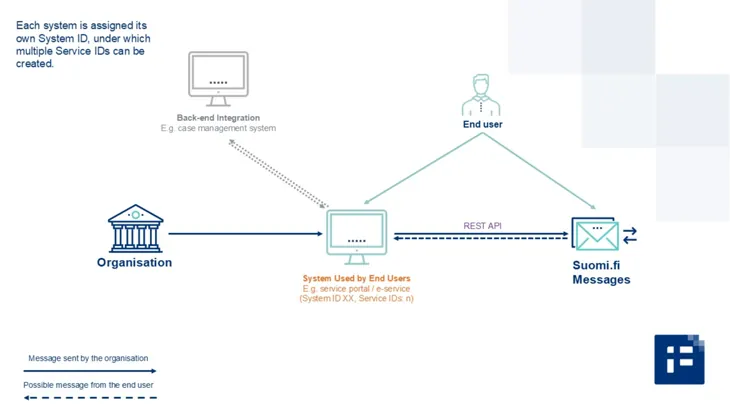
Your organisation can implement a connection directly from your system to the Suomi.fi Messages REST API. The connection can be implemented for a single system or for several separate systems.
This solution is particularly suitable when:
communication with the end user takes place mainly through one central system
case handling and decision-making take place within the system, meaning that all content related to customer communications is naturally generated as part of the process
a straightforward technical solution is preferred.
For example, you may use a case management system for which you build a connection to Suomi.fi Messages yourself or have it implemented by your system supplier. This allows you to send and receive messages directly through the case management system.
Picture: 1. Connection from a system to the Suomi.fi Messages REST API
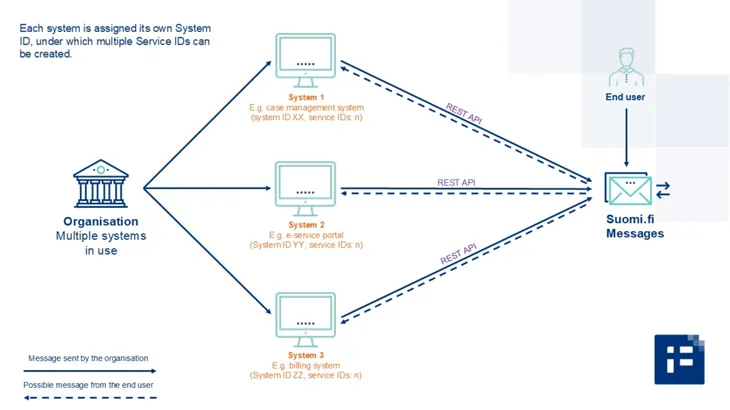
If your organisation uses several separate systems, connections to Suomi.fi Messages can be implemented for all of them. In that case, it is possible to send and receive messages through each individual system.
Picture: 2. Connection from multiple systems to the Suomi.fi Messages REST API
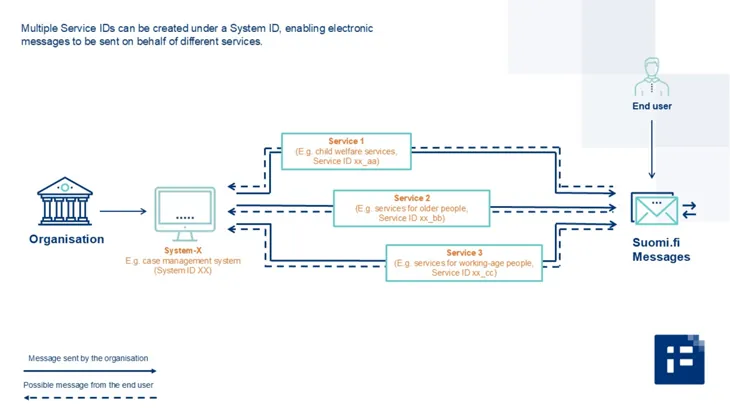
If an organisation has multiple independent systems, each system is assigned its own system ID. Under each system ID, one or more service IDs are created, depending on the service on whose behalf messages are sent.
A single system (systemId XX) can be used to send messages on behalf of several different services (serviceId xx_aa, serviceId xx_bb and serviceId xx_cc).
For example, an organisation may use a case management system through which messages are sent on behalf of child welfare services, services for older people and services for working-age people.
This makes it possible to send messages to end users on behalf of different services through a system that is widely used across the organisation. Each service can also independently decide whether to make use of two-way communication.
Picture: 3. Multiple service IDs can be added under a system ID
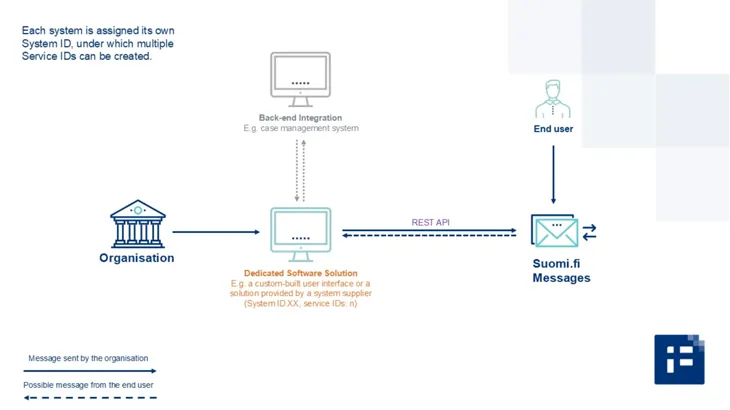
Your organisation can start using Suomi.fi Messages through a dedicated software solution designed for sending and receiving messages via Suomi.fi Messages.
the organisation’s user interface for sending and receiving messages
a technical connection to the Suomi.fi Messages REST API.
When a dedicated software solution is used, Suomi.fi Messages does not necessarily need to be integrated into all core systems.
A system ID is defined for the software solution, under which one or more service IDs can be created for communication on behalf of different services.
When is a dedicated software solution a suitable option?
Using a dedicated software solution may be a good option if:
your organisation does not wish to implement technical integrations with all core systems
messages are generated in multiple service processes or services that are not practical or possible to integrate directly with the Suomi.fi Messages REST API
electronic communication should be centralised in a single user interface
a complementary solution is needed alongside core systems for general customer communications and communications related to smaller or less frequently used services
staff need a clear and easy-to-use interface for sending and managing messages without additional development work
a replacement solution is needed for the retiring SMTP API (email connection).
How is the software solution used?
The software solution typically functions as a standalone administrative interface that employees or service managers in your organisation can access by logging in. Through the interface, users can, for example:
create and send messages to end users via Suomi.fi Messages
manage message content and attachments
monitor sent and received messages.
This reduces the need to build messaging functionality into multiple systems and simplifies communication processes within the organisation.
In many cases, it is also possible to implement back-end integrations between the software solution and the organisation’s other systems, enabling seamless data transfer between systems. This also helps avoid unnecessary transfer of information from one system to another, such as the transfer of personal data.
Picture: 4. Suomi.fi Messages can be used through a dedicated software solution
Your organisation may use an e-service as the primary channel through which end users are directed to manage their matters.
Through Suomi.fi Messages, your organisation can send the end user:
reliable information about the progress of a matter or a completed matter
a request to supplement information or provide additional information.
From an electronic message sent via Suomi.fi Messages, the end user can be securely directed by a link straight to the e-service, where the actual content can be viewed or further actions can be completed.
Within the e-service, the end user can:
read a decision or notification concerning them
view the status of a matter or related documents
take further actions, such as providing additional information, responding to a request or proceeding to the next stage of the service process.
A system ID and the required service IDs are defined for the e-service, depending on the services on whose behalf messages are sent.
Picture: 5. Suomi.fi Messages can be integrated into an e-service
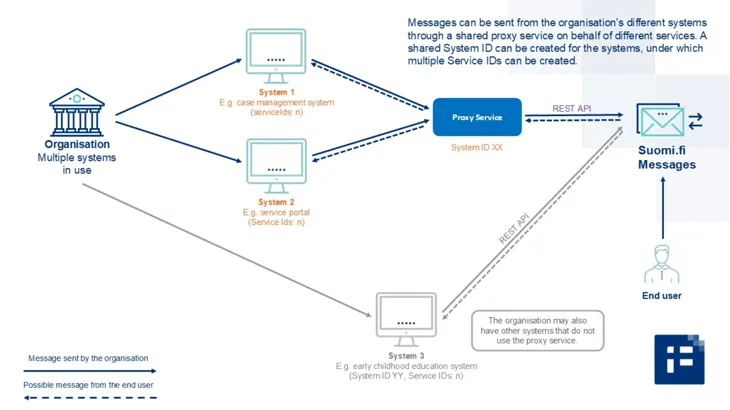
Implementing a separate integration for each system can be laborious if your organisation has multiple systems that all need to send messages through Suomi.fi Messages.
An alternative is to build a proxy service that acts as an intermediary layer between the organisation’s systems and the Suomi.fi Messages REST API. The proxy service can be implemented as the organisation’s own solution or acquired from a software supplier.
A proxy service enables:
the API connection to be implemented only once
multiple systems to make use of the same connection in a centralised manner.
This solution is particularly suitable if:
messages are sent from several different systems
the management of integrations and identifiers is to be centralised
message traffic is to be managed as a single entity.
When a proxy service is used, the organisation is typically assigned:
one system ID
under which the required number of service IDs are created.
Example: Systems used by different departments of a municipality send messages through a proxy service. The messages are presented to end users on behalf of different services.
Managing system IDs, service IDs and passwords
A separate password is defined for each system ID. It is recommended that password changes are automated.
If your organisation uses a proxy service, password changes should:
be updated simultaneously in all systems that use the proxy service
be carried out in a way that does not interrupt message delivery.
When planning the number of identifiers, it is advisable to balance:
the need for separation (multiple system IDs)
the simplicity of administration (a shared system ID).
Picture: 6. Systems can be connected to the Suomi.fi Messages REST API through a proxy service